
#13: Much A-Duo About Something
Why I love the iPhone Duo, how my apps are adapting, and an invitation to test the new Music Library Tracker. Plus, Artwork Finder is nearly ready to launch!
Dear Reader,
I've always loved weird phones. Whilst all my friends at school had the classic Nokia 3310, I had the more businesslike Nokia 6210 with its strange little replaceable "Personal Badge" at the bottom1. Next came the Nokia 5510 which was held sideways so you could type on the full QWERTY keyboard on its face. Then came my absolute favourite, the leaf-shaped Nokia 7600:
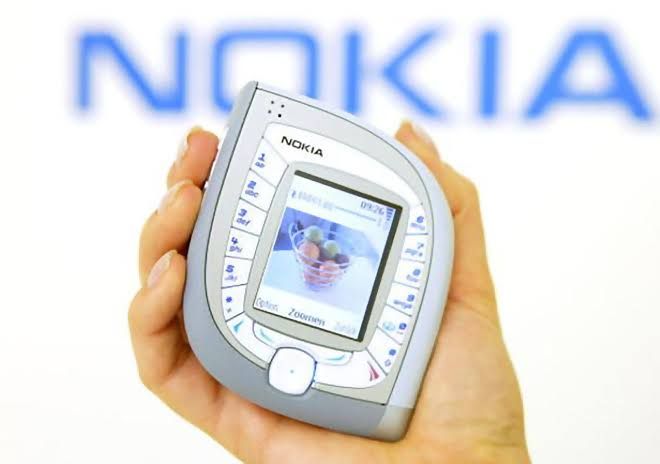
The iPhone Duo reminds me of those phones, and I absolutely love it. John Gruber described the front screen as a "small squat display" but it's the screen I use most of the time in daily use. The extra width makes typing far easier for my fat thumbs and I like having the navigation buttons over on the right within easy reach. I'd honestly buy an iPhone this shape even if it didn't unfold.
I've been perfectly happy with the cameras, even in low light, although I also preferred the photos from my iPhone 16 Pro to the ones from my 18 Pro (possibly something to do with the Photographic Styles). I thought I'd miss the Action button as I used it to unlock my door but I've been able to put the same control on my Lock Screen in place of the camera shortcut.
Face ID was the feature I was really worried about. I get eczema, which can confuse fingerprint readers, so I was surprised to find I actually prefer Touch ID this time around. It's quicker than FaceID and I don't have to angle the phone just right2. Having an Apple Watch makes unlocking the phone instantaneous and also doesn't require you to be looking directly at the device.
Is it a phone I'd recommend to everyone? Of course not. It is very, very expensive and it has some compromises. But for me personally, I love this squat phone and the nostalgia it has given me for the weird phones of the early 2000s.
Of course, owning a weird phone does mean I now have to make my apps work on it! This month I've got a Music Library Tracker beta for you to sign up for, a look at how my apps are shaping up on the Duo, and some news about the upcoming Artwork Finder launch.
As always, you can reply directly to this email if you have any feedback, comments, or questions.
– Ben
Contents
- Music Library Tracker Beta
- iPhone Duo App Updates
- Artwork Finder Releasing Soon
- Vibe Check
- Recommendations
- Roadmap
- Final Thought
Music Library Tracker Beta
I've been working on a complete rebuild of Music Library Tracker for a while now. The new scanning engine has spent the past month keeping an eye on my music library and I'd love to see how it gets on with yours!
If you'd like to test it, edit your subscription preferences and join the Music Library Tracker Beta Test group. If you have any trouble, just reply to this email and I'll add you manually. I'll be sending the beta out via TestFlight once Apple has reviewed it which I'm hoping will be within the next two weeks.

As I mentioned last month the current app uses silent push notifications to wake it up periodically. Each time it wakes up, it takes a snapshot of your music library and compares it with the previous one to see what's changed. I'd planned to keep that trick for the rebuild and just switch from Apple's old media library framework to MusicKit for the scanning itself.
It turns out Apple gave me a better way to schedule those scans back in iOS 13. With BGProcessingTask I can ask iOS to give the app time to scan your library in the background. On my iPhone most of those scans happen overnight whilst it's on charge when they run pretty reliably once an hour. The scans seem to finish much faster and the app gets more time to do its work. I've kept the silent push trick up my sleeve in case the app goes 48 hours without reporting a successful scan. I've also added a regular notification to ask you to open the app in the case that there is no scan after 5 days as this can happen when restarting your device or if you force quit the app.
iPhone Duo App Updates
Whilst I've been working on the Music Library Tracker rebuild, I've also updated the current version for the iPhone Duo. Browser Note needed a couple of tweaks too, and then I got a little carried away with Return to Dark Tower Assistant...
Music Library Tracker
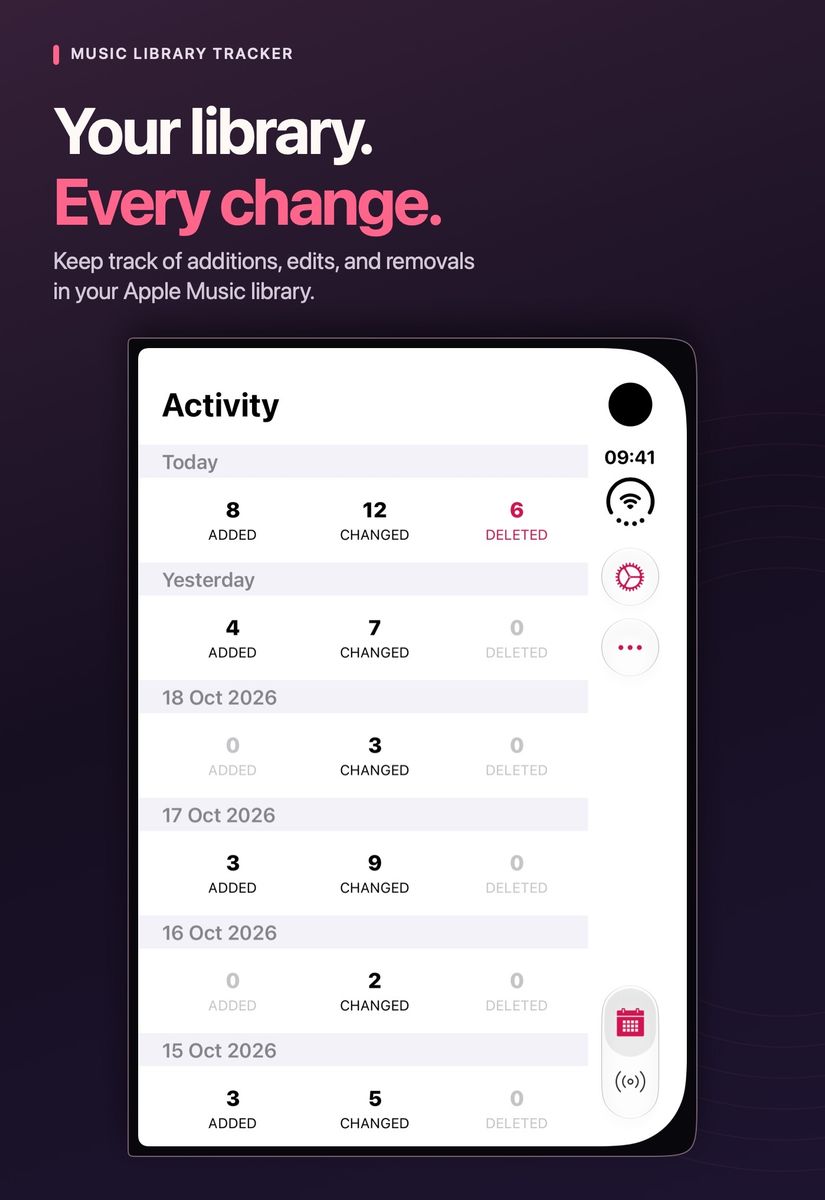
The main change in v2.3 is that the navigation now sits on the right when you're using the front screen. Open the Duo up and you get what is effectively the iPad layout which still leaves a lot to be desired. I'm leaning towards a sidebar for v3.0 which should make much better use of that space.
Browser Note
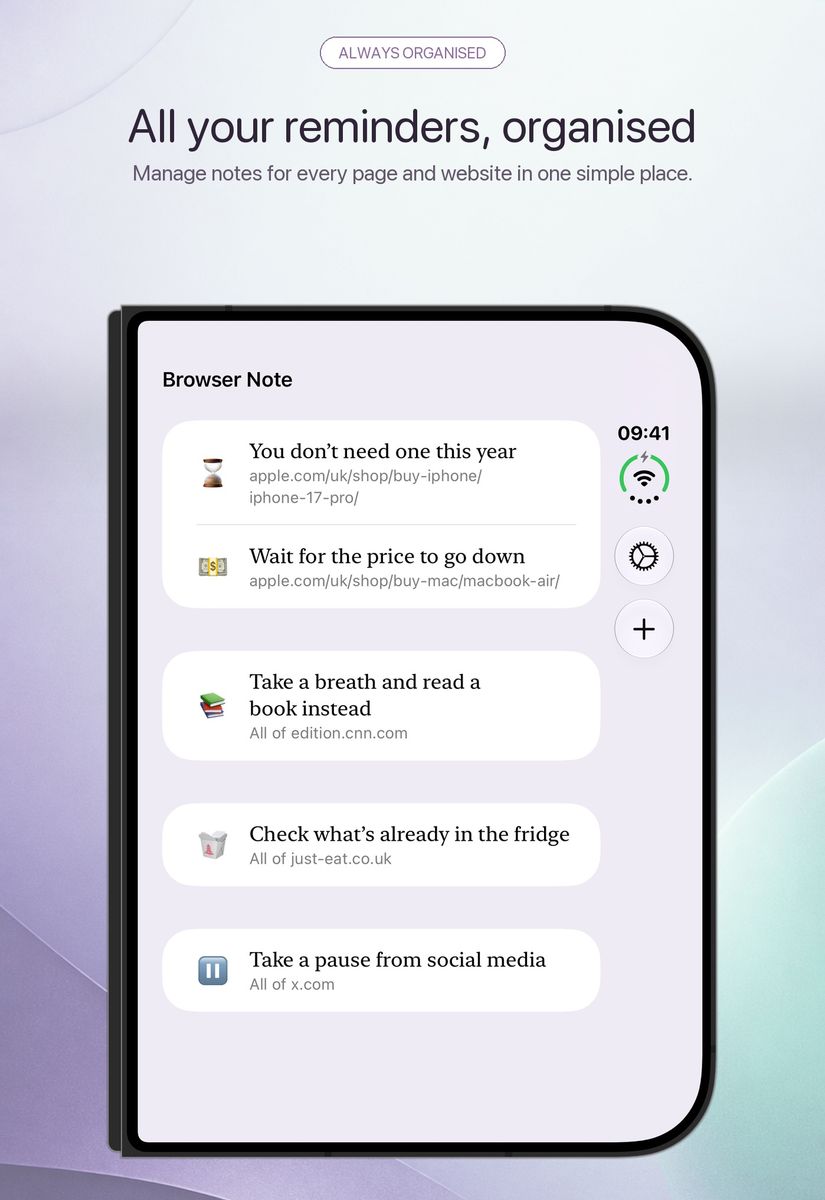
Browser Note got the same navigation change but the Safari extension needed a little more work. Bring up the keyboard on the Duo's front screen and there isn't much room left to see the note you're typing so I had to adjust the layout to make better use of the height. I also fixed a bug where the background colour of some websites would bleed into the note itself.
Return to Dark Tower Assistant
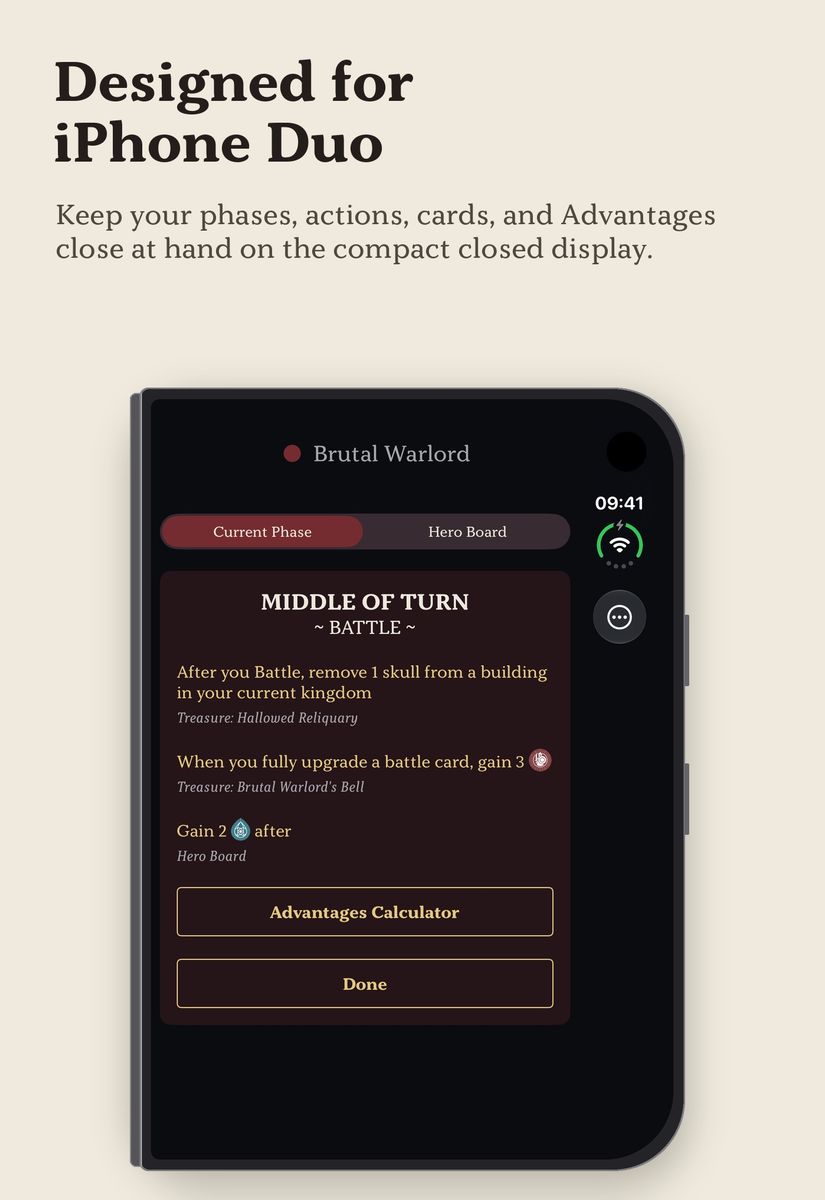
I suspect the overlap in the Venn diagram of Return to Dark Tower owners and iPhone Duo owners is very small... but it does include me! I added landscape support on iPhone which means I can now prop the Duo up in tent mode beside the board whilst I'm playing.
I also redesigned the hero screens. Each hero used to have a strip of colour across the top of the page. Now they have a small coloured icon next to their name with a different shape for each hero so you can tell them apart even if you find the colours hard to distinguish.
The third expansion – Expeditions – should be with me any day now so I'll be adding support for that as soon as I can.

Artwork Finder Releasing Soon
The direct-download Mac version of Artwork Finder is ready to go! My next step is to submit it to the Mac App Store. If it gets through App Review, I'll submit the iPhone and iPad version too with the aim of launching them all together later this month. If Apple turns it down I'll go ahead and release the Mac app on my website.
After all the new features in last month's issue I've spent most of this month squashing bugs and working out what you should be able to do with the app for free.
Whilst I generally prefer to pay a single cost for an app, it is clear that nowadays users expect to download a free app which they can try before they buy. A timed trial feels like an odd fit. If you've got a thousand films in your library, you could replace every poster before the trial was up. I've gone with a download limit instead. You can try most of the app's features for free, then subscribe to Artwork Finder Pro if you'd like to download more artwork.
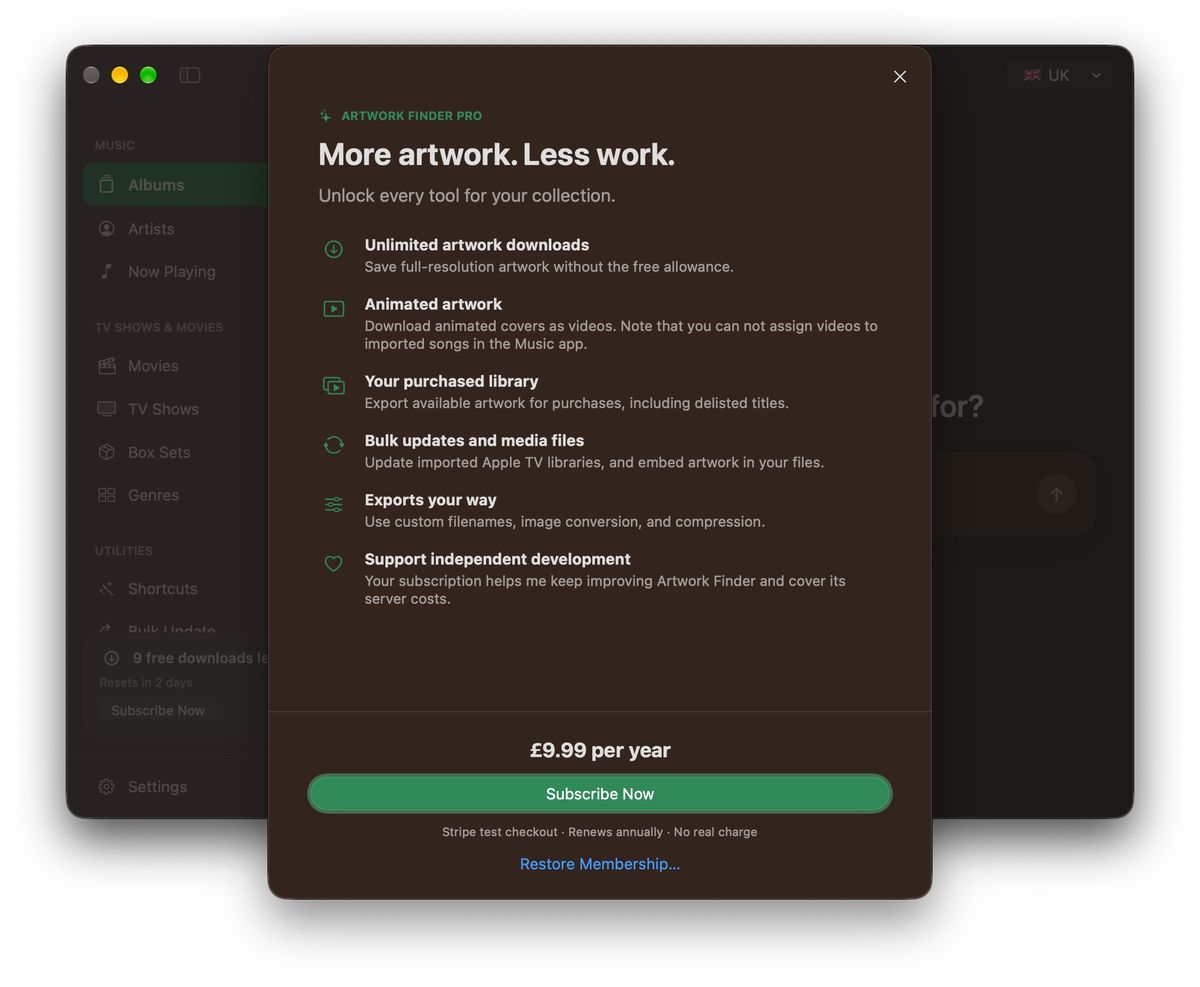
I've set the price at $10 a year for now. I haven't settled on a final figure but that feels reasonable given the cost of running the servers and the work involved in keeping the app up to date.
One thing that was new to me this month was figuring out how to sell a subscription outside the App Store. Throughout the beta, testers have been downloading the app from my website so I needed a way for that version to take payments. I settled on Managed Payments from Stripe.
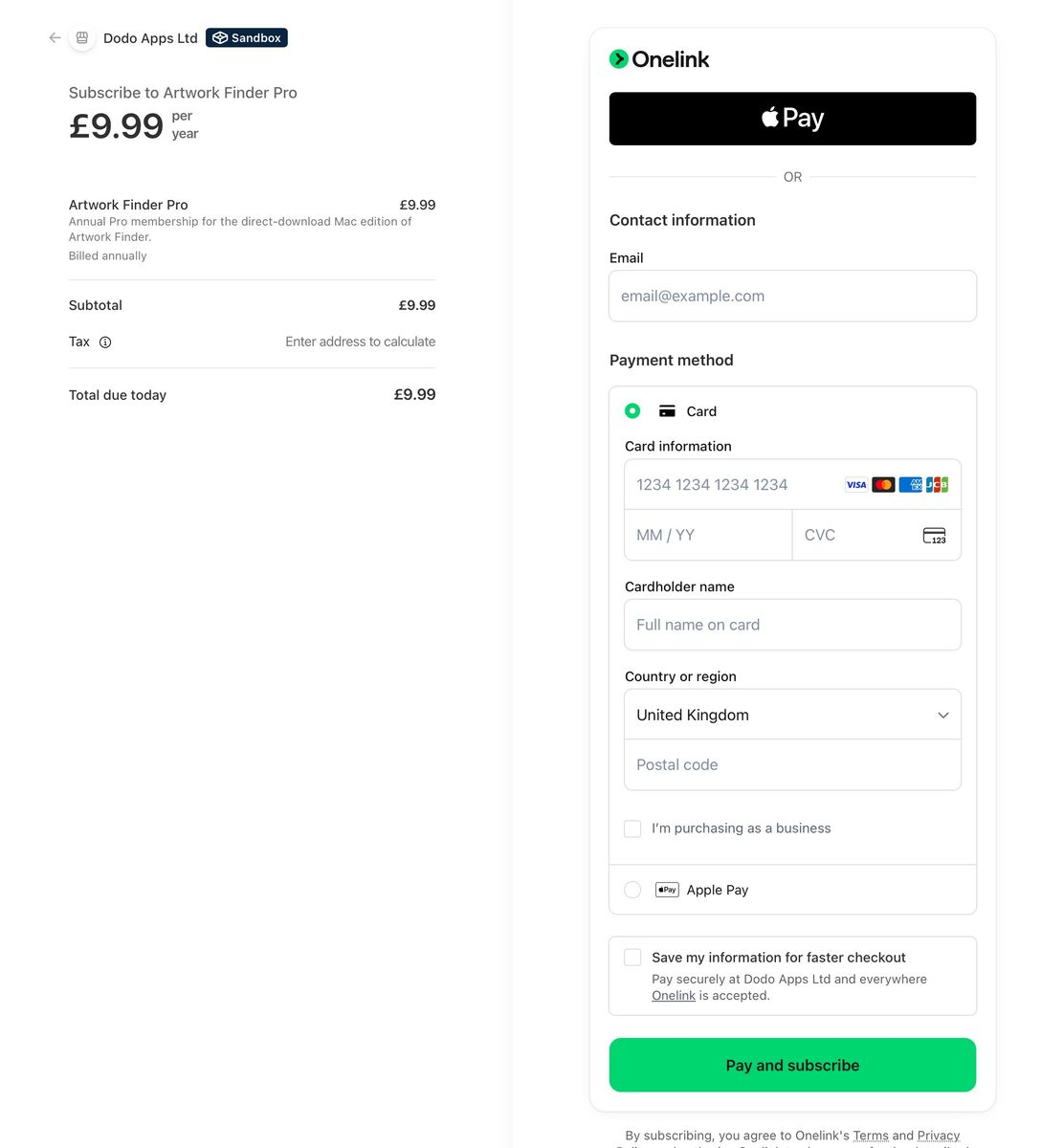
The purchase button opens a checkout page on Stripe's website and they handle the card details and recurring payments. You can access the subscription on their website from within the app if you ever want to cancel.
Once you've paid, Stripe sends you back to a "thank you" page on my website. That page uses the Buttondown API to add you to my “Product Updates” email group and record which subscription you bought. That way I can let Artwork Finder customers know when there's a free update. As always, you can unsubscribe from those emails in your newsletter preferences.
If the App Store versions go ahead, a subscription bought there will cover Mac, iPhone, and iPad. My current thinking is that the direct subscription would cover the Mac app alone, and the App Store subscription would cost a little more as you'd get all three. I'm still working that bit out and wondering if there is a way within the App Store rules to allow iPhone and iPad users access with a directly purchased subscription. I suspect not without user accounts though and that starts to make things far more complex!
If you'd like an email when Artwork Finder launches, you can join the “New Product Releases” group in your newsletter preferences.
A big thank you to everyone who tried the beta and took the time to tell me what worked and what didn't. This is the first time I've run a beta on this scale for one of my own apps and several features in the version I'm about to ship came directly from your suggestions!
Vibe Check
This is a new corner of the newsletter for the apps I've been building for my own use with considerable help from Codex. First up, an iPad app I needed for precisely one evening...
Halloween Controller
I hate Halloween but I have three young children who love it and we live on a street that gets around 200 trick-or-treaters each year. I make a nominal amount of effort 😂
For the past few years I've plugged a HomePod mini into a battery pack and hidden it inside a pumpkin. The aptly3 named Hue Halloween for Philips Hue lets me AirPlay spooky noises to the pumpkin whilst the Hue light by my front door flashes in time. This works well although it does mean spending the evening with the app open on my iPhone ready to press a button whenever someone approaches the door. I felt I could do better...
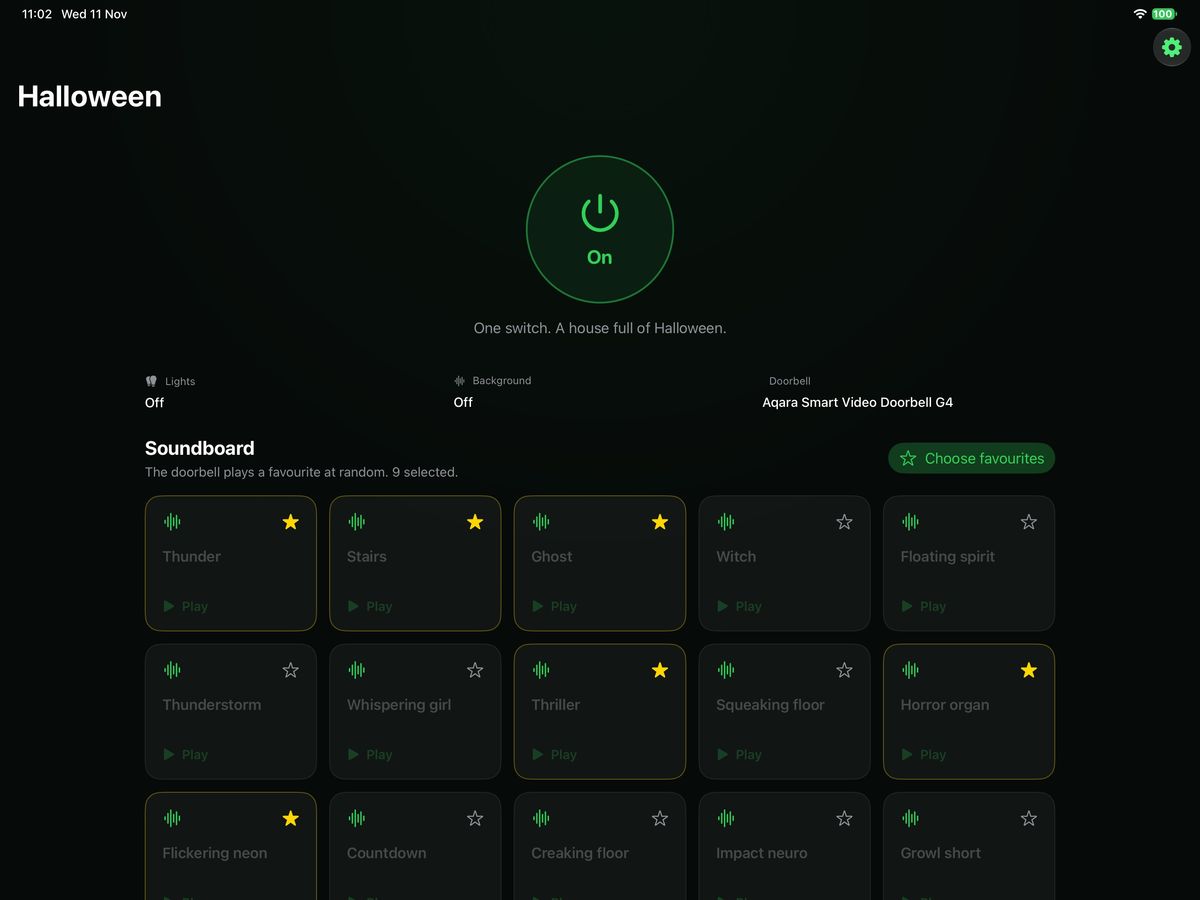
I wanted a single iPad to run the whole thing. All the Hue lights in the house, including the one by the front door, would glow green and slowly fade up and down as if the house were breathing. Meanwhile, the HomePod in the pumpkin would play the queue music from The Haunted Mansion.
The fun bit would happen when someone pressed my Aqara G4 doorbell. The house would go dark, the music would drop in volume, and a random sound effect would play whilst the front door light flickered in time. Once it finished, the music would come back up and the house would start breathing again.
I built it a piece at a time with Codex. First I wanted to see how quickly HomeKit could tell the iPad that someone had pressed the doorbell. That worked well with no perceptible lag between pressing the button and the app registering it. Getting HomeKit to trigger the lighting effects was less successful, so I paired the app directly with the Hue bridge. I also had Codex add sliders for the timings so I could dial in the AirPlay delay4 whilst watching the lights which saved me rebuilding the app every time I wanted to try a different value.
The effects themselves took a bit more ingenuity. Codex had a go at things like a flickering lamp accompanied by bursts of static but I much preferred the effects in the Hue Halloween app. Then I remembered that assets like audio files are typically unobfuscated in the IPA file and I could access this easily as it was available on the Mac App Store as a “Designed for iPad” app. I downloaded it and asked Codex to look at the app file. Not only were the audio files available but there were also JSON files with the exact timings and colours for each effect!
It took about an hour to get the whole thing up and running. On Halloween night the effects triggered as soon as someone pressed the doorbell. The one thing I'd neglected to check was whether the Wi-Fi reached the pumpkin5 so I played the audio out of a window. Something to fix for next year!
Pocket Money
My children each have three jars for their pocket money. Anything in the “save” jar earns 10% interest, anything in “share” gets doubled and given to a charity of their choice, and “spend” is.. I probably don't need to explain that one. My five-year-old is like a dragon on a pile of gold so I've had to cap how much interest he can earn in a week at the amount he gets in pocket money 🤦🏻♂️
I used to keep track of it all in a notebook. That worked fine until my son asked “How long until I have £20?” and I had to work out the compounding interest. I therefore got Codex to build me a little Pocket Money app:
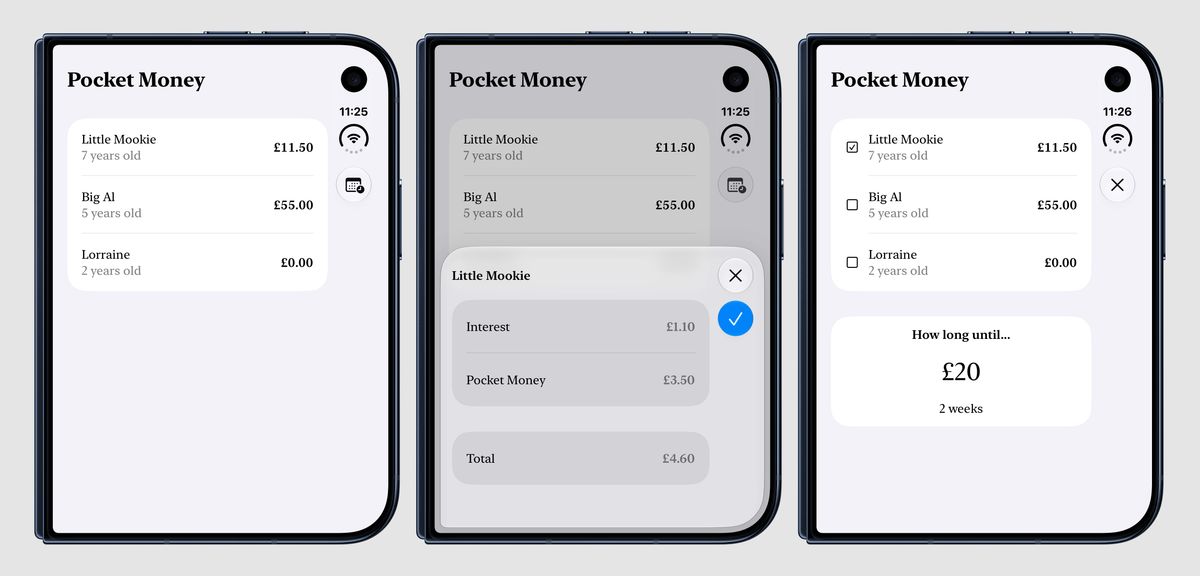
It keeps track of how much they've each got and calculates the interest for me rounded down to the nearest 10p. Now when my son asks about that £20 I can tap in the amount and tell him how long it'll take. I can even combine their savings if they ever decide to buy something together.
It took minutes to build and I use it every single Sunday.
Kids
I run a Plex server on a Mac Studio that's always on. Each of my children has an account and I use age-rating labels to control what they can each see within the “Kids Films” and “Kids TV” libraries. A while back I hand-coded them an iPad app where they can tap the poster for a show and it'll play random episodes on a loop using the native player. It's worked out great! This month I found myself wanting much the same thing on the Apple TV.
As part of my preparations for GTA6, I bought some full-sized HomePods to go with the new Apple TV. They're connected via eARC so play the audio from my consoles as well. They sound lovely! The Plex app did have one annoying quirk, though. Pause a show and the audio carries on for a couple of seconds. Press play again and the audio is muted until the picture catches up. 😬
I switched to Infuse which plays everything from my Plex server and fixed the audio lag but switching between different Plex accounts was much more fiddly. So I did what any modern software developer would do and got Codex to turn my iPad app into a tvOS app.
When the children open it, the first thing they do is pick their profile:
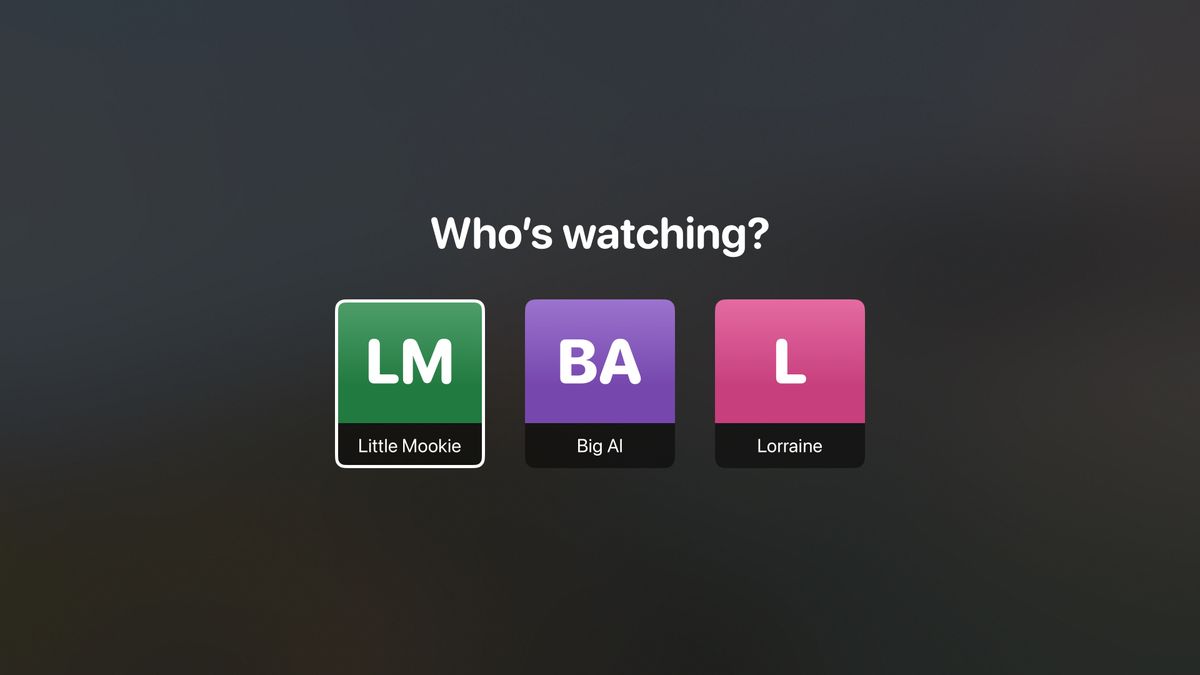
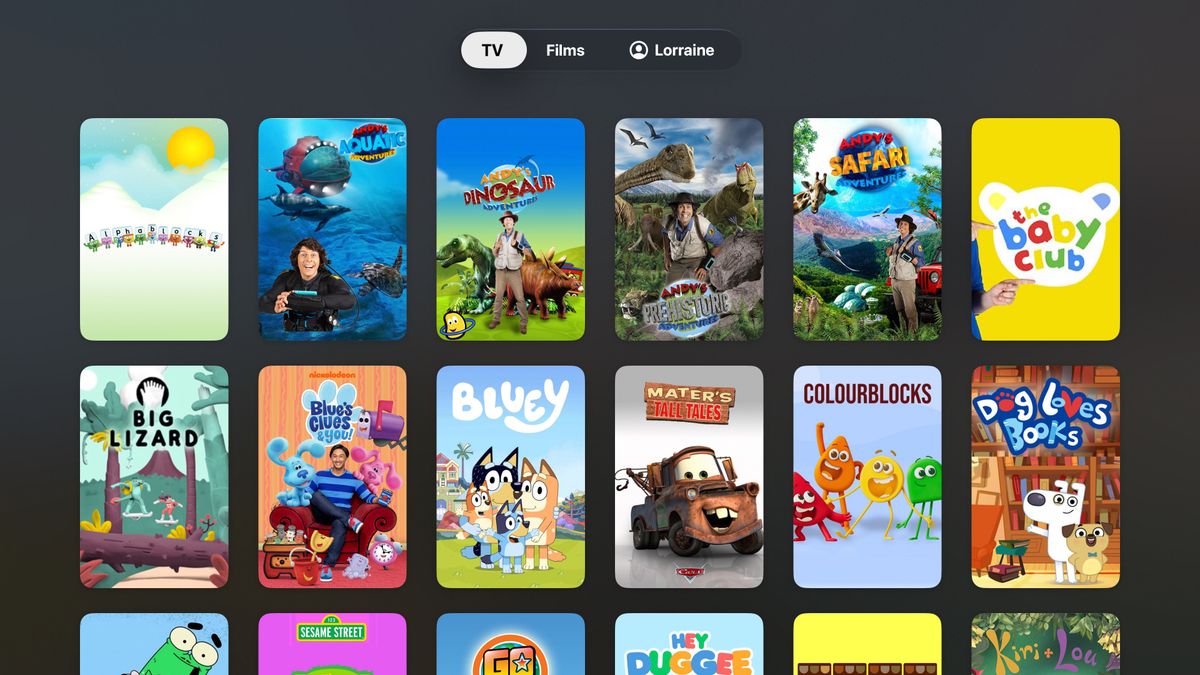
They get one tab for their TV shows and another for their films. Everything streams from Plex and plays in the native Apple TV player.
I also asked Codex for a layered Apple TV icon inspired by Saved by the Bell and ToeJam & Earl. I love it 😂

Recommendations
Video Games
- The Legend of Zelda: Ocarina of Time - It goes without saying that Ocarina of Time is one of the, if not the, best games ever made. This remake for Switch 2 is incredibly faithful to the original but adds manual jumping7 and an incredibly glossy coat of paint. It is still incredible. I really hope they remake some of the others such as Majora's Mask and Twilight Princess.
- Anno 117: Pax Romana – Dawn of the Delta - I can happily lose days to an Anno game setting up little production chains whilst my city grows around them. This expansion lets you go all Roman in Egypt and help restore the pyramids. It's fortunate that GTA VI is out next week (have I mentioned that?) as otherwise this would consume me whole!
- No. 10: Full Confidence – I found this whilst browsing the games that had been updated for the iPhone Duo. Think Reigns except you're the Prime Minister and every decision you make has to keep the Cabinet, your backbenchers, the media, and the public happy enough for you to stay in Downing Street. I can't help thinking somebody built this just for me 😂
Board Games
- Lands of Evershade - This was the main game I played on my recent board game trip to Stockholm and it was excellent. Awaken Realms games are always good but this seems to have taken inspiration from everything in their back catalogue to end up with a D&D style campaign that is incredibly smooth. I particular like the use of keywords on your character traits and items to unlock different dialogue paths through the story book. A must play!
- Deep Regrets - Advertised as "the most unsettling fishing board game ever created" this is essentially a board game copy of the video game Dredge. I bought it in Stockholm on a whim and absolutely loved it. The components are all beautiful, especially given the low price, and the rulebook made me laugh out loud several times. Upon returning to the UK I immediately 3D printed an insert and bought the expansion Even Deeper Regrets.
Podcasts
- Total Playtime - I was a huge fan of The RPS Electronic Wireless show which sadly ended when Alice Bell was laid off from RPS back in 2024. Imagine my surprise when I discovered she'd moved to Jank and created a new podcast in the exact same format with previous host Nate and others. Hearing the familiar opener of "You're listening to Total Playtime which is the only podcast you need in my opinion which is that of Alice Bell" made me incredibly happy. I signed up for a Jank membership immediately and have been consuming all the past episodes this week. Just wonderful!
Books
- The Washington Poe Series - My wife introduced me to the "Washington Poe" series of books by M. W. Craven and I've just finished the 8th book that was released a couple of months ago. Poe works for the National Crime Agency and solves serial murder cases with the socially awkward civilian analyst Tilly. All of these books have great mysteries and are incredibly funny despite being incredibly dark in places.
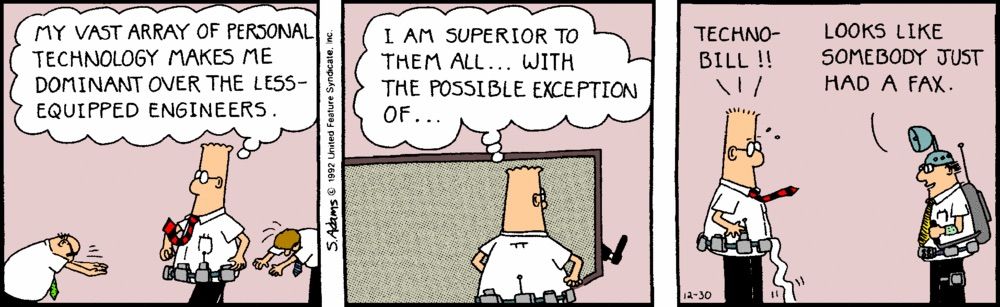
- Dilbert - Santa put a copy of "Still Pumped From Using The Mouse" in my stocking when I was 14 and I distinctly remember sitting in bed laughing my head off as I pored through it at 3am on Christmas morning. I'm not sure if it is the nostalgia of having a weird-shaped phone, replaying Ocarina of Time, and anticipating GTA, but I'm right back in that time period and so I bought most of the Dilbert books from eBay last week. They're still painfully funny.
Roadmap
The roadmap is my way of committing to what I’m going to do before the next issue:
15th October - 11th November
- Release a final beta test of Artwork Finder and prep for launch ✅
- Release Music Library Tracker v2.3 with support for the iPhone Duo ✅
- Get everything ready for a beta test of the Music Library Tracker v3 scanning engine ✅
Another good month, especially as I added Duo support to my other published apps as well.
12th November - 9th December (Issue #14)
GTA VI is out next week so lets not have any illusions of how much I'm getting done this month 😂
- Launch the Artwork Finder app
- Send out a beta for Music Library Tracker v3
Final Thought
I had everything set up in advance for my iPhone Duo preorder but the Apple Store app betrayed me and tried to use the wrong payment card. In the 10 seconds it took to switch payment method, my delivery estimate went from 23rd October (release day!) to somewhere between 2nd and 9th November.
I did eventually get my hands on a Duo by using InStock Radar to find one at an Apple Store but even then they were disappearing within seconds of coming into stock8.
I've had even less luck with the Steam Frame. I entered the reservation lottery as soon as it opened and ended up on the waiting list which means it'll probably be 2027 before I can even order one.
When component prices started going through the roof, I thought these would be two fairly easy products to get hold of. How many people were going to spend £2,000 on a phone with worse cameras than the £1,000 model? Or £900 on a VR headset in a year where Meta has decimated most of the VR game studios? Well, me, obviously. I'd just assumed there wouldn't be quite so much competition 😂
I'd love to know how much of that is down to demand and how much is down to how few units Apple and Valve have been able to make. Either way, there's something particularly galling about coming to terms with an eye-watering price only to discover that it'll be months before anyone will take your money.
In the meantime, the Arcturus Vision Camera I pre-ordered for the Steam Frame is sitting on my desk, still in its box, glaring at me...
That’s all for this issue! If you have any feedback, questions, or suggestions for things you’d like me to talk about, reply to this email or drop me a line at ben@bendodson.com. I love hearing from you! And if you know someone who’d enjoy the newsletter, please pass it along.
Until next time,
– Ben
-
I seem to remember I had engraved musical notes on mine. ↩
-
This may also be coming from an iPhone 18 Pro which had notably worse FaceID most likely due to the newer system being under the display rather than in the Dynamic Island. ↩
-
Or should that be "app-tly" *rimshot* ↩
-
Turns out it was exactly 2 seconds. ↩
-
I'd switched to a different WiFi setup this year and didn't think to test it 🤦🏻♂️ ↩
-
Did you know it's coming out next week? ↩
-
Great for getting over the banisters in the Forest Temple! ↩
-
The only exception was Glasgow. There were 1TB models appearing all over the country that disappeared within seconds but the one in Glasgow remained for 27 minutes. Clearly the Scots don't want that much storage 😂 ↩