
#12: Somehow, Music Library Tracker returned
v2.2 is out now and v3.0 development is off to a good start!
Dear Reader,
I’ve kept my promise of writing another issue after four weeks although for some of you this might be the first newsletter you’ve received in over three years. My move from Substack to Buttondown hasn’t been entirely smooth: a large number of emails to Gmail addresses bounced and the links to edit your subscription preferences and join the Artwork Finder beta didn’t work reliably. I’m hoping both issues are now resolved!
In the meantime, I’ve had a very busy month. I’ve sent out two betas of the upcoming Artwork Finder app with a ton of new features, released the first update to Music Library Tracker in several years, and dusted off the code for its v3 rebuild which is now successfully scanning my library and playlists. I also somehow found time to build a completely new app for my own use.
I’ve written this issue slightly early as, by the time you read it, I’ll be in Stockholm for my annual board game week with my good friend John. That means I’ll have missed yesterday’s “Welcome home” Apple event, but I’m sure I’ll have plenty to say about it next time along with the iPhone Duo which I’ll be pre-ordering when I’m back in England!
As always, you can reply directly to this email if you have any feedback.
– Ben
Contents
- Music Library Tracker
- Artwork Finder Update
- Apple Music Artwork Finder
- Malkinson
- Recommendations
- Roadmap
- Final Thought
Music Library Tracker
It isn’t quite Halloween yet, but that hasn’t stopped me reanimating the corpse of this app which has been "resting" for over two years.
For those that aren’t familiar, Music Library Tracker started life in 2016 as a way to spot changes Apple made to your music library such as tracks disappearing when a licensing deal ended. It takes periodic snapshots of your library and compares them to show what has changed. I later added the ability to detect which of your tracks have been upgraded to Spatial Audio, a feature that is still unrivalled on the App Store.
I have two updates to share today:
v3.0 - Rebuild
As you may recall, I’ve been working on a complete rebuild of the app for some time. This will have a completely new UI, a scanning engine that can work with playlists, and a native macOS version1. I’m happy to say I’ve reached the first internal milestone: the new scanning engine is now running on my device!
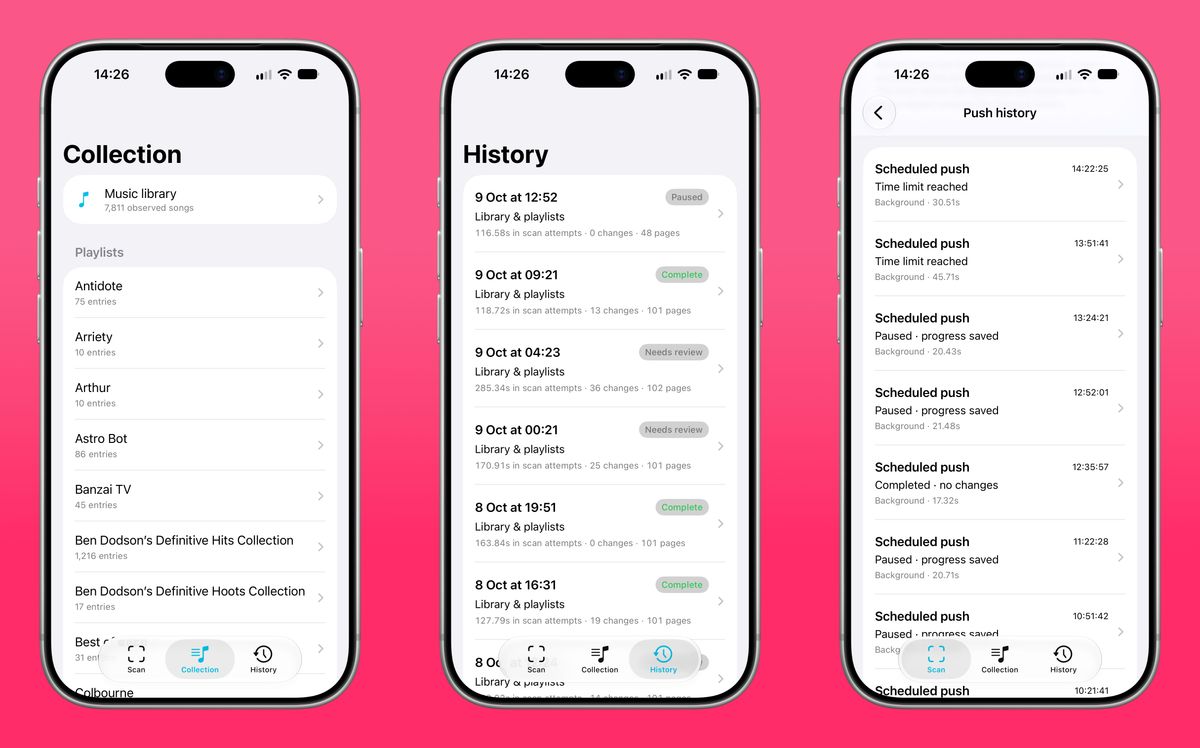
It uses Apple’s newer MusicKit framework and can correctly scan both my library and all of my playlists. It also runs periodically in the background throughout the day using silent push notifications sent at 30-minute intervals. The UI is purely for debugging; the finished app will look nothing like this!
I’m going to keep testing it for a little longer but I expect to be able to invite you to a beta test next month. That initial test will focus on the scanning engine rather than the interface or the full app. Getting it working with my own library is one thing, but some people have 150,000 imported songs whilst others have far fewer tracks spread across 2,000 playlists. I need to make sure it can cope with all of those variations before building the rest of the app around it.
v2.2 - Available now!
I’d always planned to release another update before v3.0, if only to lay the groundwork for upgrading. However, my hand was forced slightly by an issue with push notifications.
Music Library Tracker needs to scan your library regularly without you having to remember to open it. As iOS doesn’t let third-party apps run on a precise schedule in the background I use an Apple technology called silent push notifications. These don’t display a message or make a sound – hence the name – but they give the app a short window to do some work in the background.
Until recently I was sending one every hour giving the app around 30 seconds to work through another bit of the scanning process. These background sessions have strict limits on CPU use so they’re slower than scanning with the app open but those small windows add up to around 12 minutes a day. That’s more than enough to snapshot the library and check for differences.
The problem was that I used a company called OneSignal to send these notifications. Every hour I’d send a “broadcast” push which would wake up all the devices with the app installed. This had always been free but OneSignal recently changed its pricing so you have to pay if you have more than 1,000 monthly active users. The costs are fairly significant and include a load of AI stuff I have no interest in. On 1st October my account was suspended and the background scans stopped.
To fix this I built a new system using Amazon SNS. It does a similar job but gives me more flexibility with costs based on what I’m actually using. It also lets me improve how the notifications are sent. Previously, sending a broadcast every hour meant potentially waking tens of thousands of devices at once. As the Spatial Audio matching happens on my server, that could look suspiciously like a denial of service attack 😅. I’d partly mitigated this by adding a random chance of running a Spatial Audio check but it wasn’t ideal.
The new system spreads notifications out so each device gets one every 30 minutes with different devices waking at different times. That means more frequent opportunities to scan without everyone arriving at my server at once.
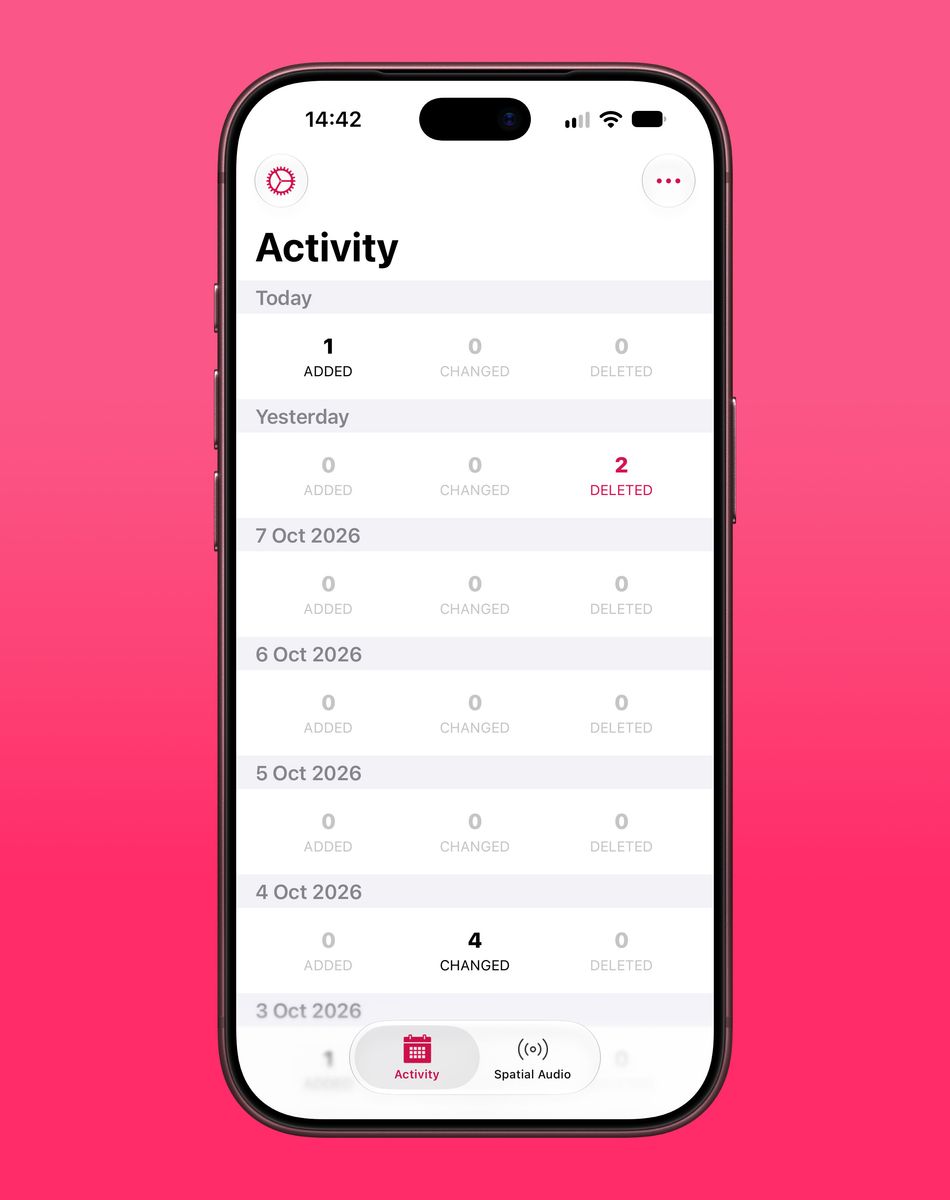
Aside from the notifications, I also decided to build the app with the latest iOS 27 SDK which meant it was time to do something about the user interface. It now uses Liquid Glass throughout and has toned down the bright pink that existed previously. The interface is by no means perfect, but it will last until the rebuild and will be easier to get working with the iPhone Duo later this month.
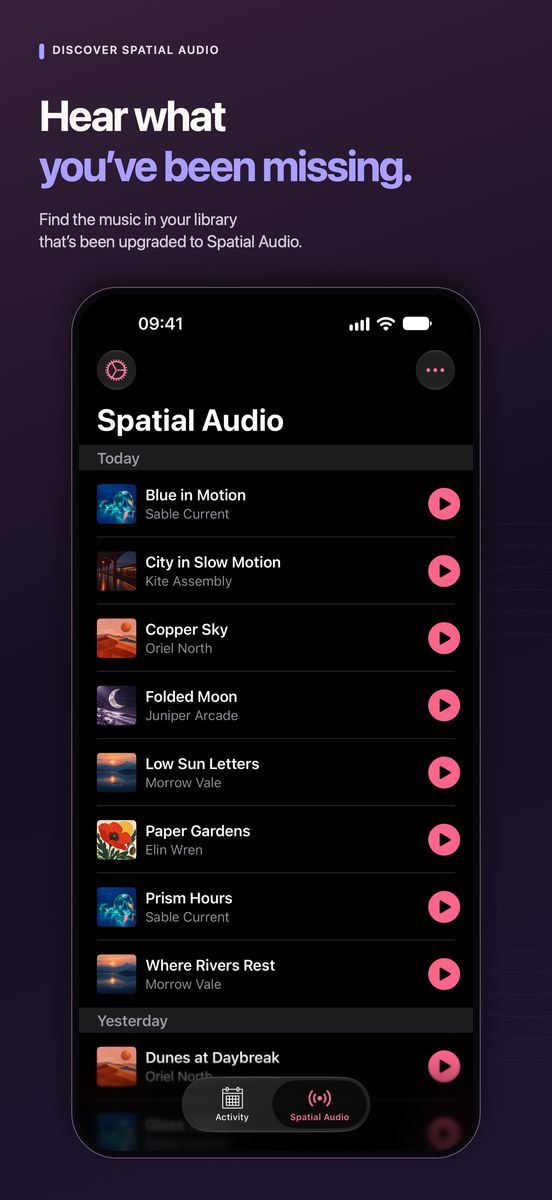
One of the main reasons I put updates like this off is that I hate going through the App Store process, particularly updating screenshots and text. Changing the interface meant I couldn’t avoid new screenshots and this app is particularly awkward to capture. To look realistic, it needs several days’ worth of library changes but I can’t use real albums or artwork due to copyright issues.
This time I got Codex to create some fictional albums and artwork, populate a database with changes to those albums, and automatically take the necessary screenshots. It then framed them, sized them, and added the text for the App Store. I had to make a few minor tweak but the whole process took under 30 minutes and should be much faster next time.
This is the sort of task I love using AI for. I have zero interest in creating simulated data or App Store screenshots and now I don’t have to!
Music Library Tracker v2.2 is available now as a free update on the App Store. v2.3 with support for the iPhone Duo will be available by 23rd October.
Artwork Finder Update
I sent out the first beta of Artwork Finder a week after the last newsletter and received a huge amount of useful feedback. That led to a second beta a week later with a number of new features several of which came directly from your suggestions.
You can read the full release notes online but there are a few additions I’m particularly pleased with:
Add artwork directly to your files
You can now drag a file onto an image in Artwork Finder to embed that artwork directly into the file. You can also drop several files at once which is particularly handy if you want to add high-resolution artwork to an entire album of MP3s.
Supported formats include .mp3, .m4a, .mp4, .m4v, .flac, .aif, .aiff, .mkv, .mka, .mk3d, and .mks 😅
Bulk updates for movies and TV shows
If you’ve imported movies or TV shows into the TV app, you can now update their artwork in bulk. This is particularly useful if you want to replace the older 16:9 landscape artwork with the newer 2:3 portrait versions without going through everything individually.
Requested by Robert M.
Custom filenames and export settings
You can now choose how files are named when you save artwork or drag it out of the app, with different settings for each media type. For example, you might want every album cover saved as cover.jpg but prefer your movie artwork to use the title, such as Jurassic Park.jpg.
I’ve also added options to automatically convert PNG images to JPEG, either every time or only when they exceed a chosen file size. There’s a separate setting to compress JPEGs above a certain size as well giving you a bit more control over those particularly large images.
Requested by Ruben B.
“Get Library Artist URLs” shortcut action
This new action retrieves the artist URLs from your music library so you can use them in Shortcuts. Combined with the existing artwork actions, it lets you download artwork for all the artists in your library.
I’ve also improved how the actions handle failures so one unsuccessful item won’t stop a shortcut that’s working through hundreds or thousands of assets.
Requested by Brian G.
Automatic updates with Sparkle
The app can now check for updates and install them itself using Sparkle. I’ve heard developers mention it for years but this is the first time I’ve used it in one of my own apps. It works great!
I’m likely to send out a third beta next week to test the purchasing side of things including unlocking certain features with a “pro” purchase. After that I think it should be ready to launch 🎉
If you'd like to test the app, all you have to do is go and edit your subscription preferences and join the Artwork Finder Exclusive Beta Test group. If you run into any issues, just reply to this email and I can add you manually.
Apple Music Artwork Finder
I've added two updates to my online Apple Music Artwork Finder this month.
Artist Logo
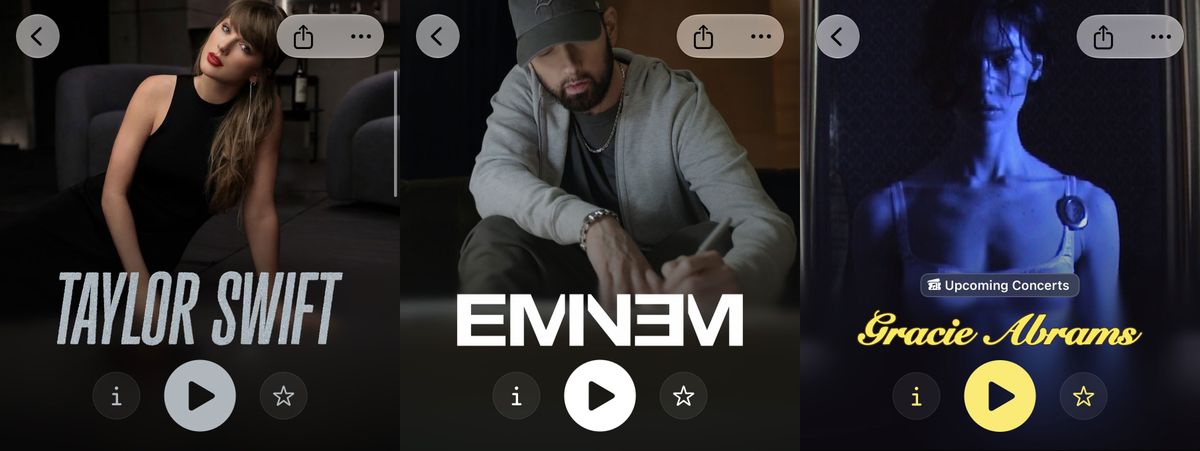
iOS 27 introduced a new type of artwork to Apple Music: artist logos. These are PNG images that can be displayed in place of an artist’s name:
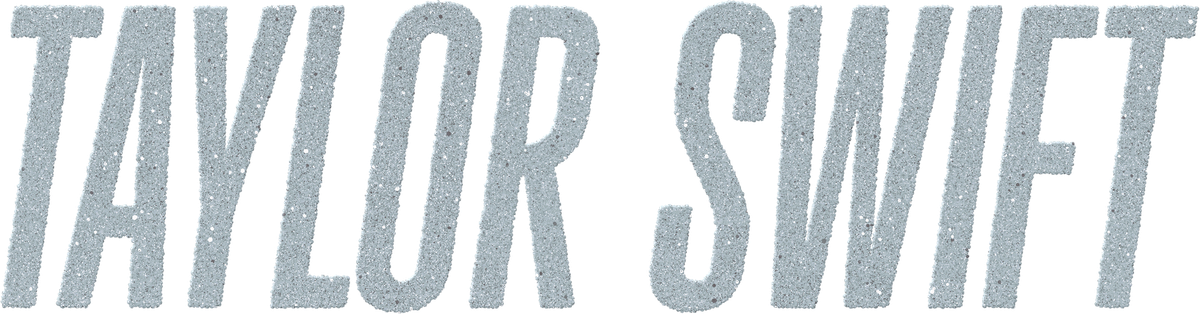
Pasting an artist URL into the artwork finder will now return the high-resolution logo, where available, alongside the usual profile images:
iTunes Exclusive Albums
Another one for the Swifties: it turns out that Apple Music’s exclusive releases can get in the way when you’re looking for a particular album cover.
Taylor Swift’s latest release, “Patient Zero”, appears as “Patient Zero (Video Bundle) – Single” on Apple Music but as “Patient Zero – Single” on iTunes and other streaming services. The two versions have different artwork, so searching Apple Music alone wouldn’t get you both.
To fix this, album searches now check both Apple Music and iTunes and intelligently adds any albums with artwork that isn't available on Apple Music. In this case, that means you can download the artwork for either version of "Patient Zero".
Both of these additions are also available in the Artwork Finder app 🥳
Malkinson
I’ve had type 2 diabetes for the past couple of years and have taken to wearing a Dexcom ONE+ continuous glucose monitor so I can keep an eye on what my blood sugar is doing.
I find these devices quite fascinating. It’s a small sensor, roughly the size of a CR2032 battery, with a very thin filament that sits beneath the skin. You apply it to your arm with a little applicator (which I’ve found surprisingly painless) and a plaster-like adhesive holds it in place. It lasts for 10 days and uses Bluetooth Low Energy to report your glucose level and whether it’s rising, falling, or staying steady.
The device itself works very well. The app it connects to is another matter.
Firstly, whilst it writes readings to Apple Health it does so with a three-hour delay2. I don’t particularly like the interface of either Dexcom or Apple Health for reviewing my blood sugar, so I use Glucomate made by indie developer Zach Simone. The delay means it’s useful for looking back at what happened earlier but can’t show me what’s happening right now.
Firstly, whilst it writes to the Health app, there is a 3-hour delay on this happening. I don't like the UI of either Dexcom or Apple Health for reviewing blood sugar data so I use Glucomate made by indie developer Zach Simone. The 3-hour delay is frustrating for this as it means the app only becomes useful for historical data rather than what is happening today.
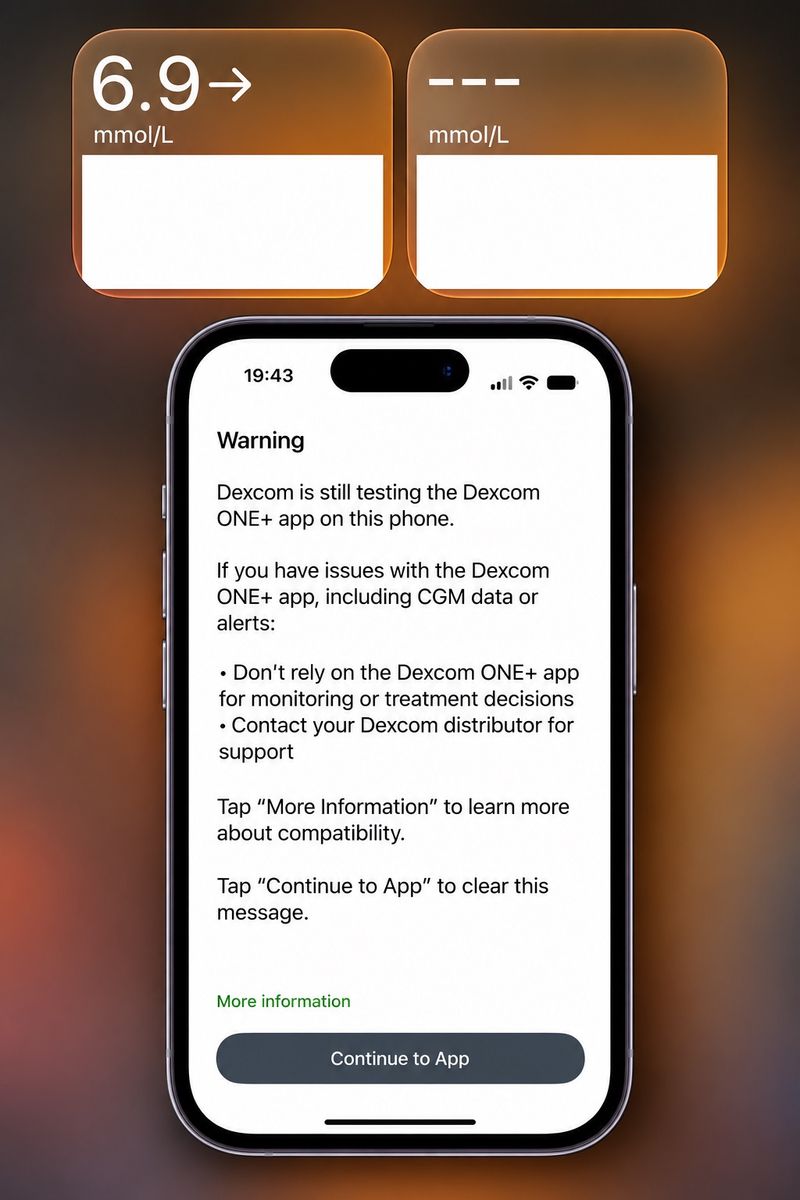
Then there’s the Dexcom app’s lack of support for newer iOS features. Its home screen widgets don’t work properly with clear or tinted styles as the graph has a solid background which turns white. There are no widgets for the lock screen or Apple Watch and every time I open the app3 I have to dismiss a warning telling me it hasn’t been tested on iOS 27 yet:
So, I did what I always do and decided to build my own app.
This was surprisingly straightforward thanks to the community project xDrip4iOS which has reverse engineered the protocol used by the sensor and done the hard work of pairing with it and collecting readings. They have their own open-source app, but I only needed the part that retrieves the data.
The result is a very basic app for my own use named Malkinson4. It sends my readings to Apple Health as soon as they arrive and provides a lock screen widget showing my latest reading and the time it was recorded.
There’s a companion Apple Watch app as well which exists purely to add a curved complication to the “Simple” watch face. This shows my reading as both a number and a gauge running from 3.8 to 10.0.
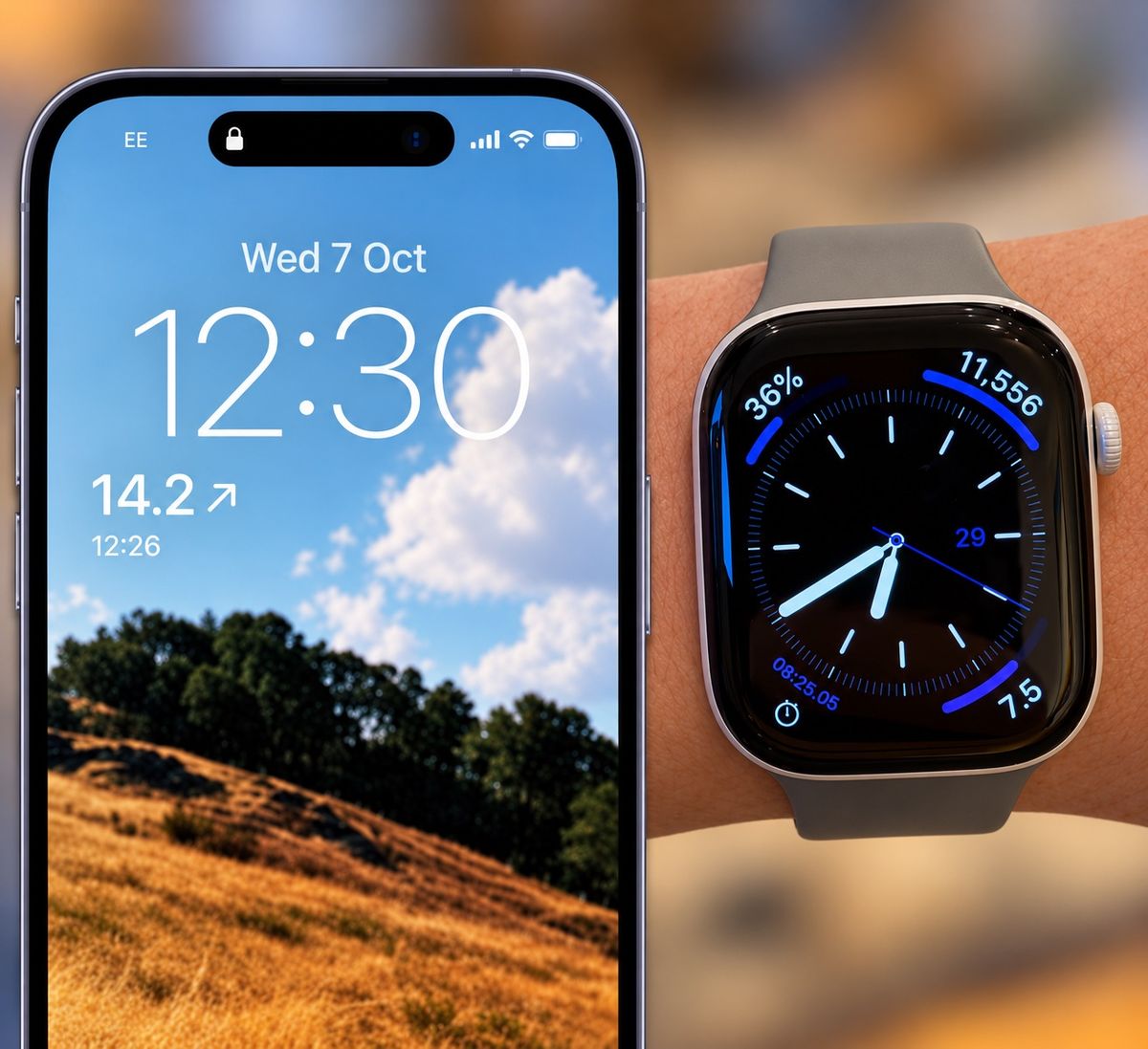
I’ve been using it for a couple of weeks now and it has worked flawlessly. I’m particularly pleased that the widgets have been updating every five minutes, something the Dexcom app struggled with. Quite often I’d see “---” instead of a reading which meant opening the app and getting past the inevitable “we haven’t checked this version of iOS” screen 🙄
Having the reading on my wrist and lock screen is also far more convenient than a home screen widget and means I’m much more aware of what’s going on. As I often say, the greatest thing about being a software developer is being able to build things that work exactly how you want them to!
Recommendations
Video Games
- Well Dweller - An unexpected gem of a Metroidvania that appeared on Game Pass this month. It’s far easier than Silksong or MIO but that’s no bad thing. It feels more respectful of my time with easy fast travel and save points just before boss fights. There’s no soulslike “go back to where you died or lose everything you collected” mechanic and the story is easy to follow. My game of the year for 20265 so far!
- Star Wars Galactic Racer - I was always fond of Pod Racer on the N64, but it was very much a rinse-and-repeat racing game. Galactic Racer mixes racing with a roguelike structure giving you several ways to approach winning a championship. You might put points into boosting or drifting, add offensive weaponry to knock out your opponents, or invest in autopilot and let a droid do the driving. The story is absolute bobbins, but the sound design of the creaks and groans of the speeders have kept me coming back.
TV
- Celebrity Traitors - The second UK series has recently started and has been just as good as Traitors always is. Whilst I’m usually not a fan of “celebrity” shows6, the bookings for both series have been excellent. I’ve watched every series of every version of the show (including the foreign-language ones) and it’s still thrilling to see a new group enter the castle.
Music
- Stray Dogs by Nothing But Thieves - A new album from my favourite band. Whilst I don't think it hits the heights of the deluxe version of Dead Club City, there are still a number of excellent tracks here including Evolution, Baby Kool (Evelyn), and (my personal favourite) A Different Kind of Happiness.
Products
- Dyson CameraJet - As I'm English, I do have the stereotypical terrible teeth that make it hard to use dental floss. For years I've used a Sonicare AirFloss but it is quite punishing and I often forget to bring it into my routine. When I saw Dyson had made a toothbrush, I knew I had to have it. The key feature is a camera that detects the gaps between your teeth and fires mouthwash through them whilst you brush. I've only had it for a week but I've definitely noticed an improvement. It fired 98 times in on session which feels fairly thorough!
Roadmap
The roadmap is my way of committing to what I’m going to do before the next issue:
16th September - 14th October
- Continue iterating on Artwork Finder depending on tester feedback ✅
- Do a quick update on Browser Note to support iOS 27 and prepare for the iPhone Duo ✅
- Open up the codebase for Music Library Tracker v3 and get back up to speed with the scanning engine ✅
- Actually send another newsletter in 4 weeks ✅
I'm pretty pleased with that, especially as I did some other updates and a brand new personal app as well!
15th October - 11th November (Issue #13)
I’m away this week, then it’s half-term, then I’m away again for another week, so I think we’ll keep things fairly light:
- Release a final beta test of Artwork Finder and prep for launch
- Release Music Library Tracker v2.3 with support for the iPhone Duo
- Get everything ready for a beta test of the Music Library Tracker v3 scanning engine
Final Thought
I’m getting increasingly frustrated by services that insist on emailing me a “magic link” when I’d be perfectly happy signing in with a username and password. It feels particularly unnecessary now that the Passwords app on iOS makes generating and using strong passwords and passkeys so straightforward. Instead, I have to open my email, wait for a message to arrive, and follow a link just to get back to what I was doing.
The worst offender for me is OpenAI. It gives me the option of an email link or my password but if I choose the password it sends me an email with a verification code anyway 🤦🏻♂️
What friction point annoys you the most in modern apps?
That’s all for this issue! If you have any feedback, questions, or suggestions for things you’d like me to talk about, reply to this email or drop me a line at ben@bendodson.com. I love hearing from you! And if you know someone who’d enjoy the newsletter, please pass it along.
Until next time,
– Ben
-
The current macOS version is only for Apple Silicon as it is really running the iOS app. Annoyingly, it doesn't work with Spatial Audio matching due to the way that Apple has ported their media library SDKs. I'd personally prefer not to have this version on the store at all but it was enabled automatically by Apple and some people use it so I can't disable it now. ↩
-
Essentially the FDA required a delay as otherwise health repositories like Apple Health and Google Fit could potentially be used for treatment decisions (i.e. insulin dosing) which attract additional regulatory oversight. 3-hour old data is considered retrospective so was able to be placed in general purpose repositories. ↩
-
And I do mean every time. Even when you leave the app and go right back in, up it pops. ↩
-
Named after the South Park character: "I'm Scott Malkinson, I have diabetes". ↩
-
Until the 19th of November I suspect. ↩
-
Mostly because I have no idea who most of them are as I don't want Love Island. ↩