
#11: Has It Really Been Over Three Years?
An exclusive beta test, updates on my apps and websites, and thoughts on the iPhone Duo.
Dear Reader,
The last time I sent out this newsletter, back in June 2023, there were around 800 subscribers. Silence has proven to be golden as there are now over 4,600 of you!
To those of you receiving this for the first time, I'm Ben Dodson and you have likely signed up from my website after using one of my many artwork finders. These newsletters tend to be a mixture of things I'm working on and things I've found interesting - I hope you'll enjoy it and stick around.
To those that have been long-term subscribers, welcome back! I've switched from Substack to Buttondown to send these newsletters so you may notice they come from a different email address and look slightly different.
So what have I been doing in the past 39 months? I had my third baby in November 2023 which likely accounts for the lack of any updates since then but I have been slowly working on a number of coding projects. Some of them you've likely already seen but I have a brand new app to announce today – Artwork Finder – which you're exclusively invited to test!
This issue is mostly going to be a whistle-stop tour of the current status of my apps and projects and then I'll be returning to more of a development log from next month onwards. I'd love to hear any feedback you have via ben@bendodson.com.
– Ben
Contents
- New App Announcement and Beta Test 🎉
- Downloading Artwork with Apple Shortcuts
- App Sale and Updates
- Website Developments
- Thoughts on the Apple Event
- Recommendations
- Roadmap and Final Thought
New App Announcement and Beta Test 🎉
I've been providing high-resolution artwork on my website for over 13 years and have got pretty good at gaining access to artwork that you can't get anywhere else. My experiment with the Apple shortcuts on Gumroad has shown there is an appetite for better ways to access artwork and so I'm happy to announce a new app I've been working on for the past few months: Artwork Finder!
This native macOS app is an amalgamation of all my artwork finder tools and shortcuts. It can get artwork for albums, artists, movies, TV shows, box sets, and genres all in the highest possible quality. It can download animated album covers and find all manner of promotional artwork for movies. It fetches the portrait artwork favoured by iOS 26 but also the landscape and square artwork from previous versions.
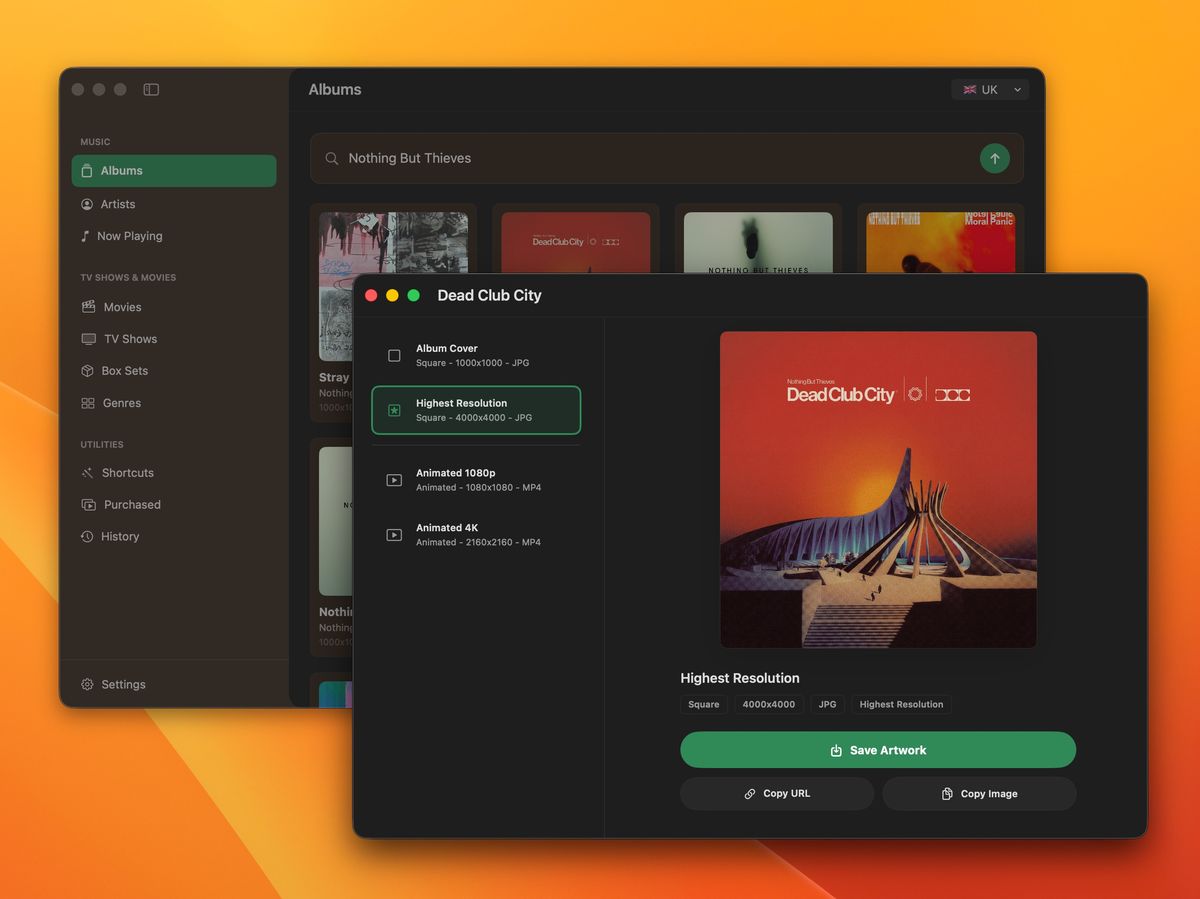
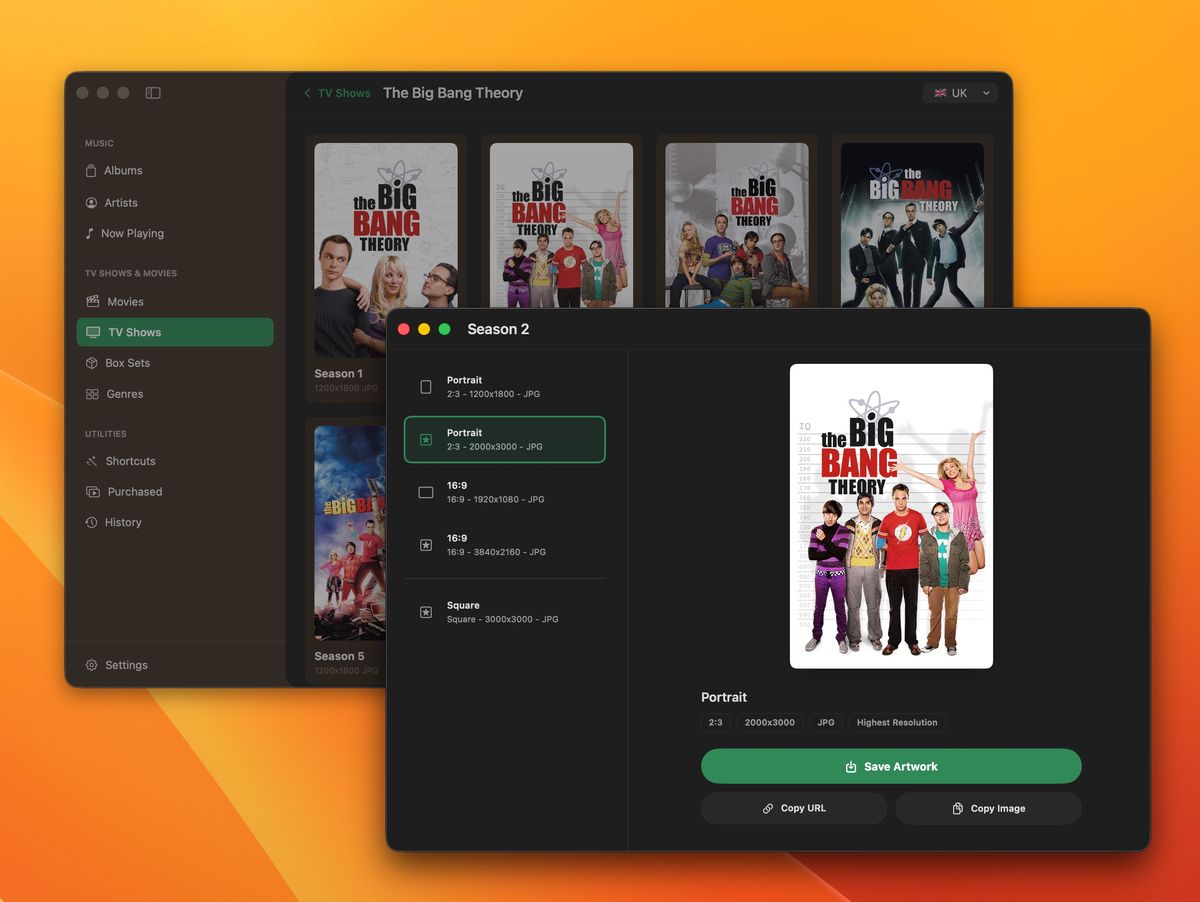
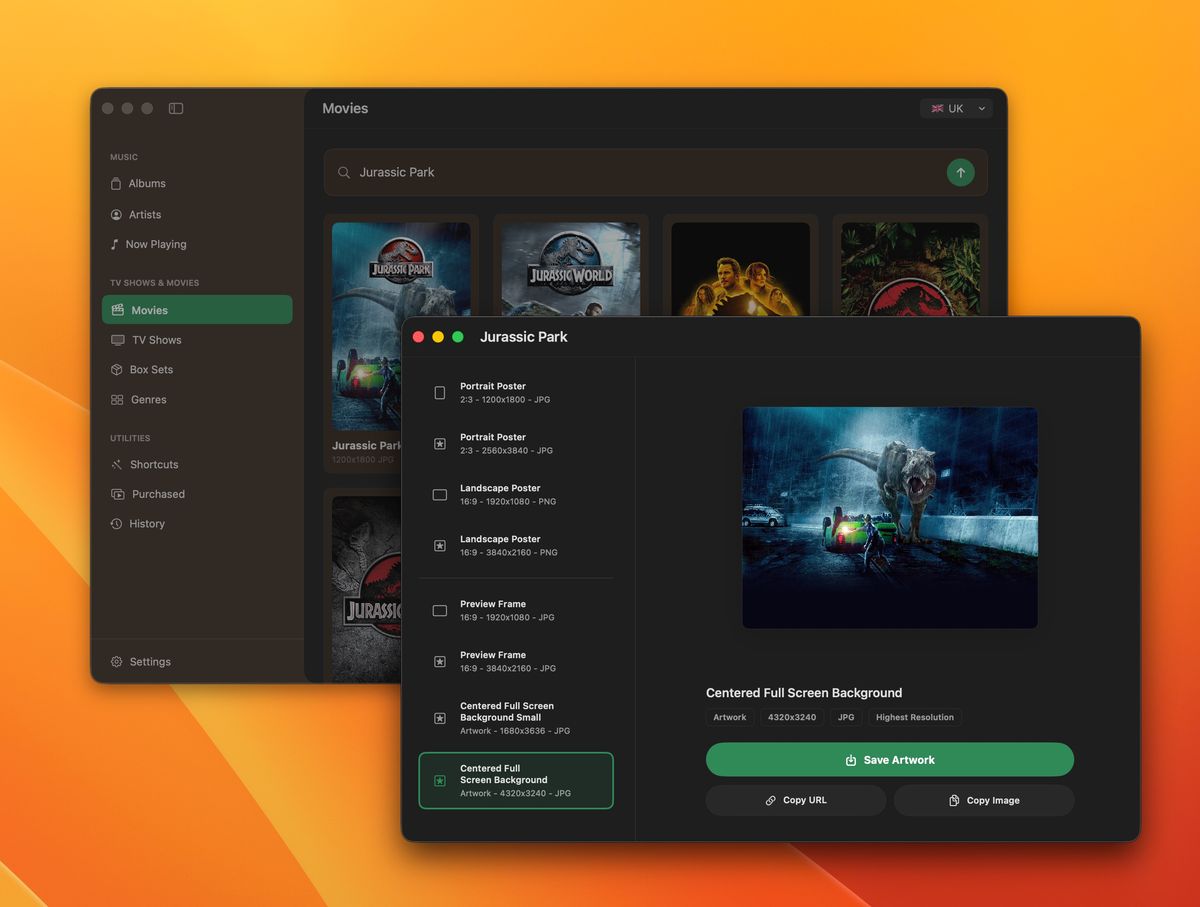
All of this is wrapped up in a best-in-class Mac experience with support for drag and drop, automatic fetching of artwork for songs you are listening to, and a full suite of built-in actions for use with Shortcuts.
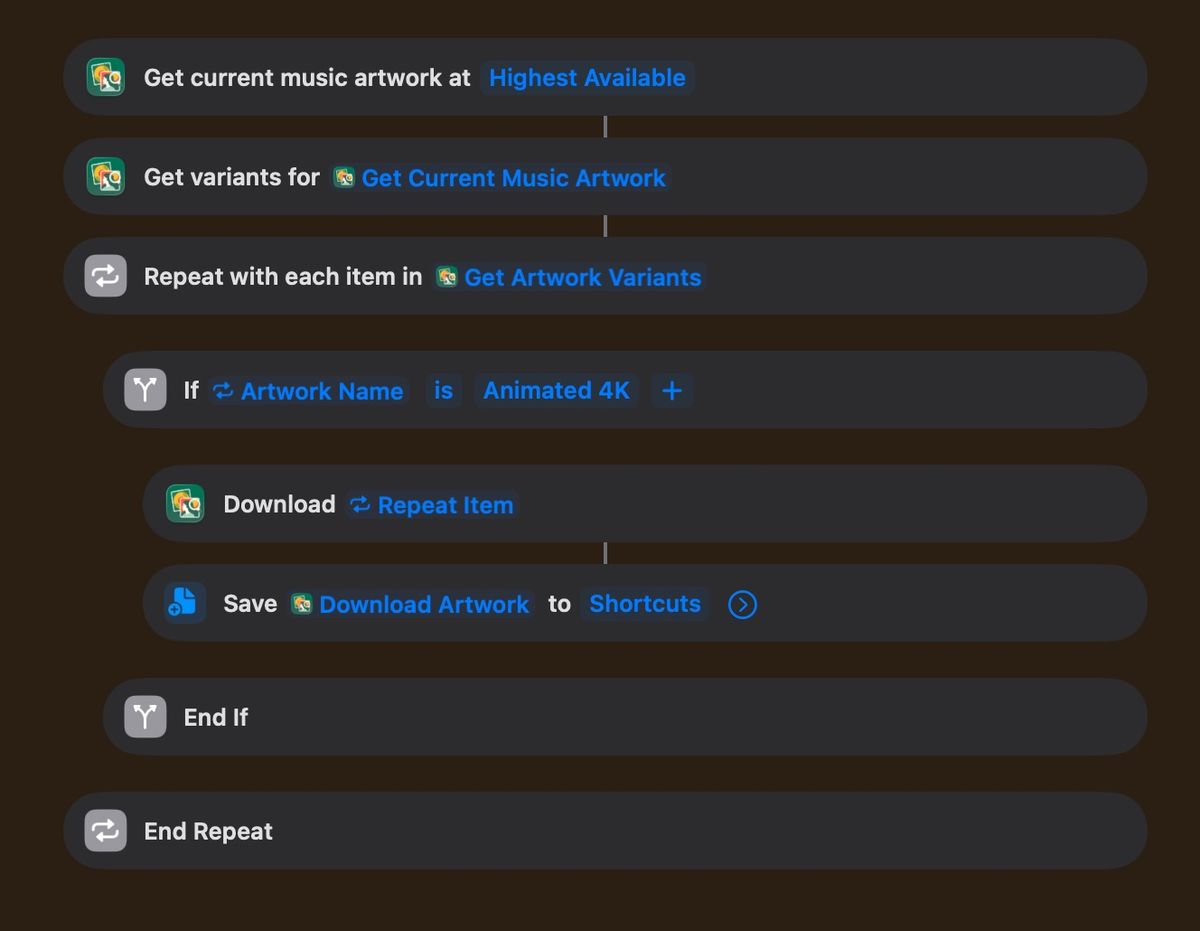
For now, the app is exclusive to macOS but I'm working on a version for iPhone and iPad as well.
As a subscriber to this newsletter, you're invited to take part in an exclusive beta test of this app. All you have to do is go and edit your subscription preferences and join the new Artwork Finder Exclusive Beta Test group. I'll then send you an email with instructions on how to get started once the test begins on the 23rd of September 2026. You will need to be running either macOS Tahoe or macOS Golden Gate to take part.
Downloading Artwork with Apple Shortcuts
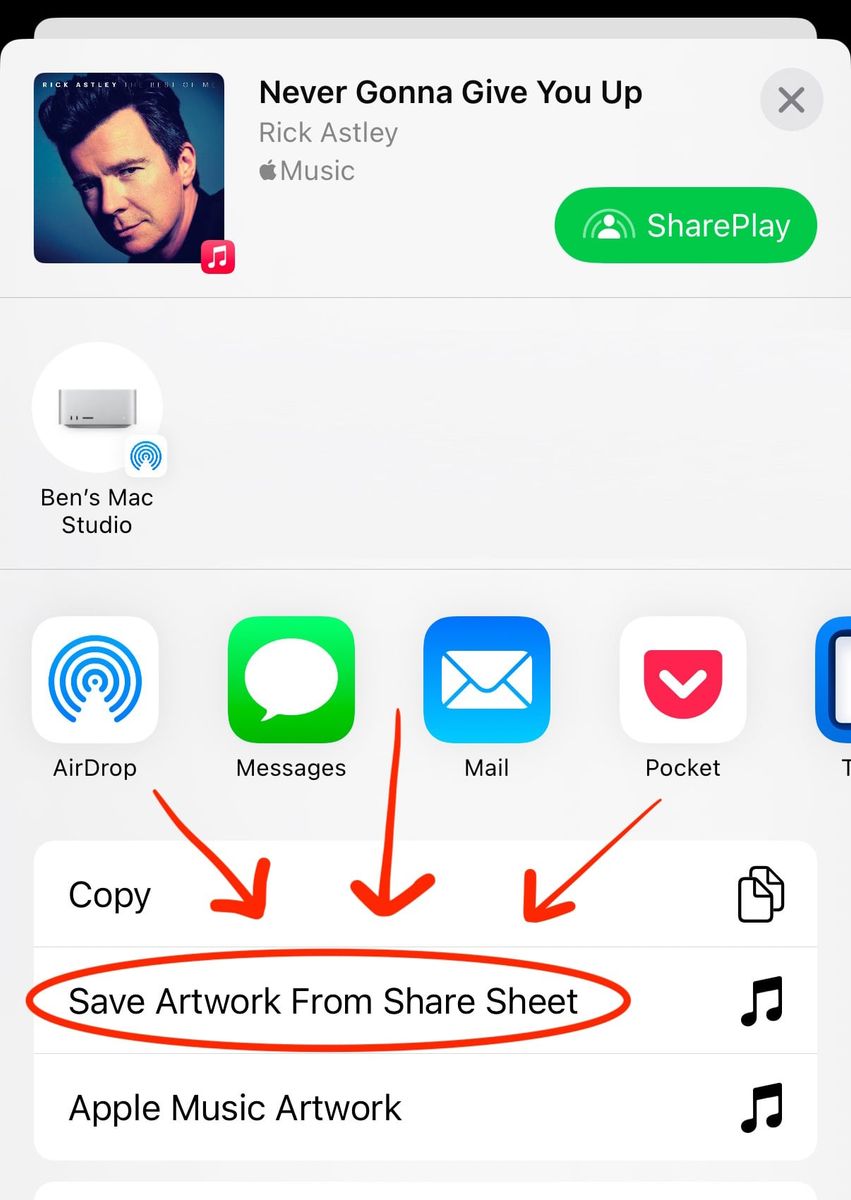
One new product I launched during my multi-year hiatus was a pair of Apple shortcuts for downloading artwork. They are appropriately named the Hi-Res Apple Music Artwork shortcut and Hi-Res Apple TV Artwork shortcut respectively and allow you to take the URLs from Apple Music and Apple TV to download the highest-quality artwork. This can lead to powerful automations and the ability to perform batch downloads of artwork.
They have been purchased over 1,100 times and have had excellent feedback from automators and Shortcuts hobbyists. They can be purchased for $2 individually or $3 for both. Check them out on my Gumroad page.
You may think to yourself, “Why should I buy these shortcuts when you have a new app coming out that already includes these features?” To that I’d say, “Good question, perceptive reader!” Everyone who has ever bought either of my shortcuts will receive a discount on Artwork Finder at launch.
I now offer three ways to download high-resolution artwork:
- The Artwork Finder app: This contains a rich browsing and download experience as well as automations and other tools. It will be improved over time and covers (no pun intended) all of the different types of media my other projects up to now have supported. In short, it is the best way of getting high-resolution artwork in 2026.
- The Apple shortcuts: These were designed for those that need to automate their workflows and they do the job very well as you can quickly bulk download multiple covers. Whilst I anticipate the Artwork Finder app will replace these shortcuts for most users (hence the discount I’ll offer), they’ll remain useful for those who only have an iPhone or iPad as I can't guarantee the app will come to those devices due to App Store Review.
- The websites: Most of you are probably reading this newsletter because you are one of the many thousands of people that use my Artwork Finder websites every day; in one memorable exchange, an Apple Store employee who recognised my name grabbed his Apple Store employee girlfriend to introduce her to me and say "he is why our media library looks hot shit, babe" 😂 These sites are great for one-off downloads and they are free to use. For most people this will be enough, but for those that want a bit more the other two options exist.
App Sale and Updates
I am an app developer by trade so I normally use this newsletter to detail the apps I'm building at the moment. The vast majority of these tend to be for my own personal use but I have a few that make it to the App Store. As I've already got a lot to go through this issue, I'm just going to cover two apps today.
Before I get to that, my apps have been on sale periodically over the years to coincide with Indie App Sales. I probably should have sent an email out during that time so to make it up to you I've taken 50% off all my apps until the end of September!
Music Library Tracker
This is my most popular app and has been watching over users' music libraries since 2016. The app works by taking periodic snapshots of your music library and then alerts you when something changes either because you made a change or (more likely) because a streaming deal ended and Apple replaced a track with one from a different album (or in some cases just deletes it entirely). In 2023 I updated the app so it could tell you which of your tracks have been upgraded to Spatial Audio, a feature no other app can do even now.
I have been working on a complete rebuild of the app for some time as long-time readers will know. The rebuild will include an improved snapshot engine with support for playlists as well as tracking for both Spatial Audio and Hi-Res Lossless. I have made some progress on these features but it is still going to take a while until it is ready to launch. I'm going to use this newsletter as a development diary of sorts and hope to have some further news next month.
Currently the app is a paid app but I am planning on switching the business model to be a free app with limited usage and an in-app purchase to unlock the full app. All existing users before that date (including, for instance, those that buy it in that lovely 50% off sale I just mentioned 👀) will get a free lifetime unlock to v3 automatically at launch!
Browser Note
This app allows you to add a fullscreen note to a website so you can either block yourself from seeing it entirely or give yourself a reminder before you access a page. I use it to remind myself to read a book rather than reading the news but I've also found it useful for reminding me that I have a coupon code when coming back to a store several weeks later.
Last month I launched v2 of the app with a completely new design1 as well as a few requested features such as the ability to tap a note to copy it to your clipboard. The app is also now free to download with a one-off purchase if you want to save more than 3 notes. If you bought the v1 app previously, that lifetime unlock is already enabled for you!
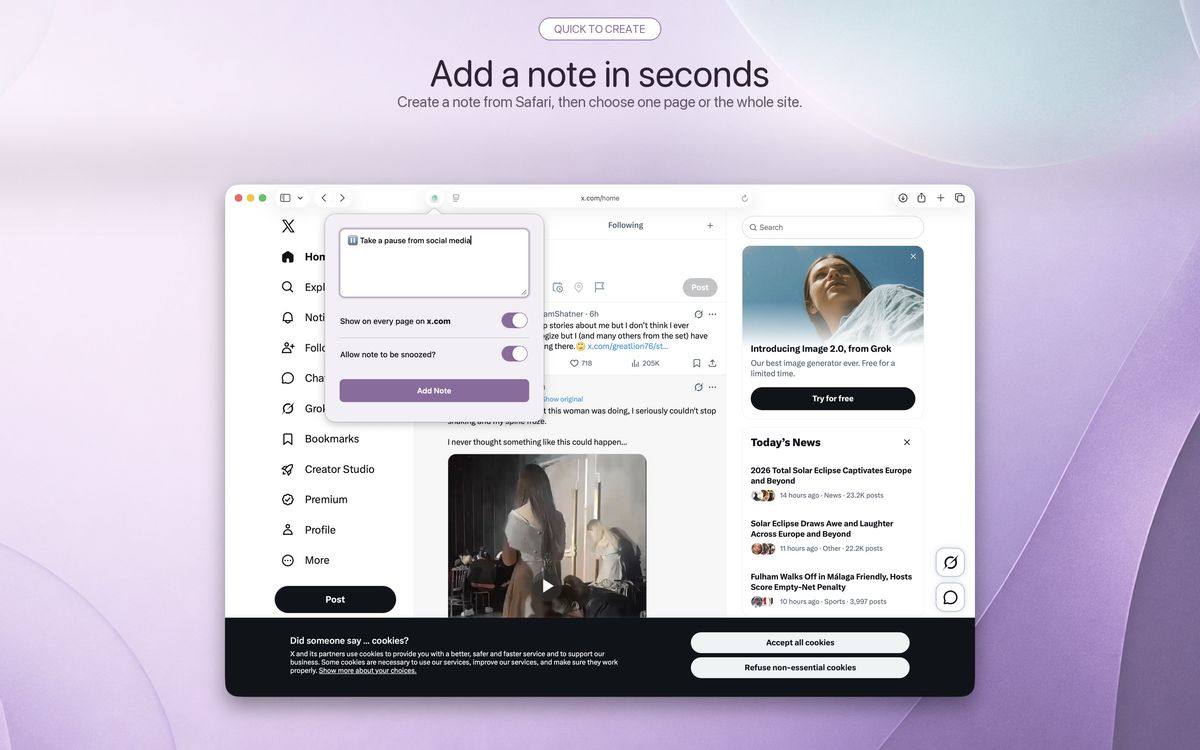
All your notes sync seamlessly across your devices including iPhone, iPad, Mac, and Vision Pro. Give it a try for free today and don't forget the one-time unlock is 50% off until the end of September.
Website Developments
I completely rebuilt BenDodson.com earlier this year and it finally has a mobile-friendly design2 as well as a toggle to switch between light and dark modes. I'm also using a CloudFront instance for images so they load much faster and are automatically sized and formatted for the device you are viewing them on3.
Everything is still statically generated with Jekyll and has no analytics or tracking so it loads ridiculously quickly. As I've never had analytics I've never really seen how popular the site is but that changed once I enabled the Google Search Console which lets Google tell me how many times they have led people to the website. It turns out there are around 30,000 people arriving from Google every month and it is ranked #8 for the search term "iTunes" 😂
Whilst my website is mostly a promotional tool for my own consultancy and software development work, it is also home to a number of popular tools:
Apple TV Shows & Movies Artwork Finder
iOS 26 helpfully completely changed the way artwork is rendered within Apple TV going from a landscape 16:9 image to a portrait 2:3 image so I updated my artwork finder accordingly4. You can search for movies, TV shows, or box sets and get the highest resolution artwork available.
The previous version could only find artwork for shows and movies that were available either on the Apple TV streaming service5 or were available for purchase. I've changed that so it can now fetch artwork from any service that connects to the Apple TV app such as Disney Plus and BBC iPlayer.
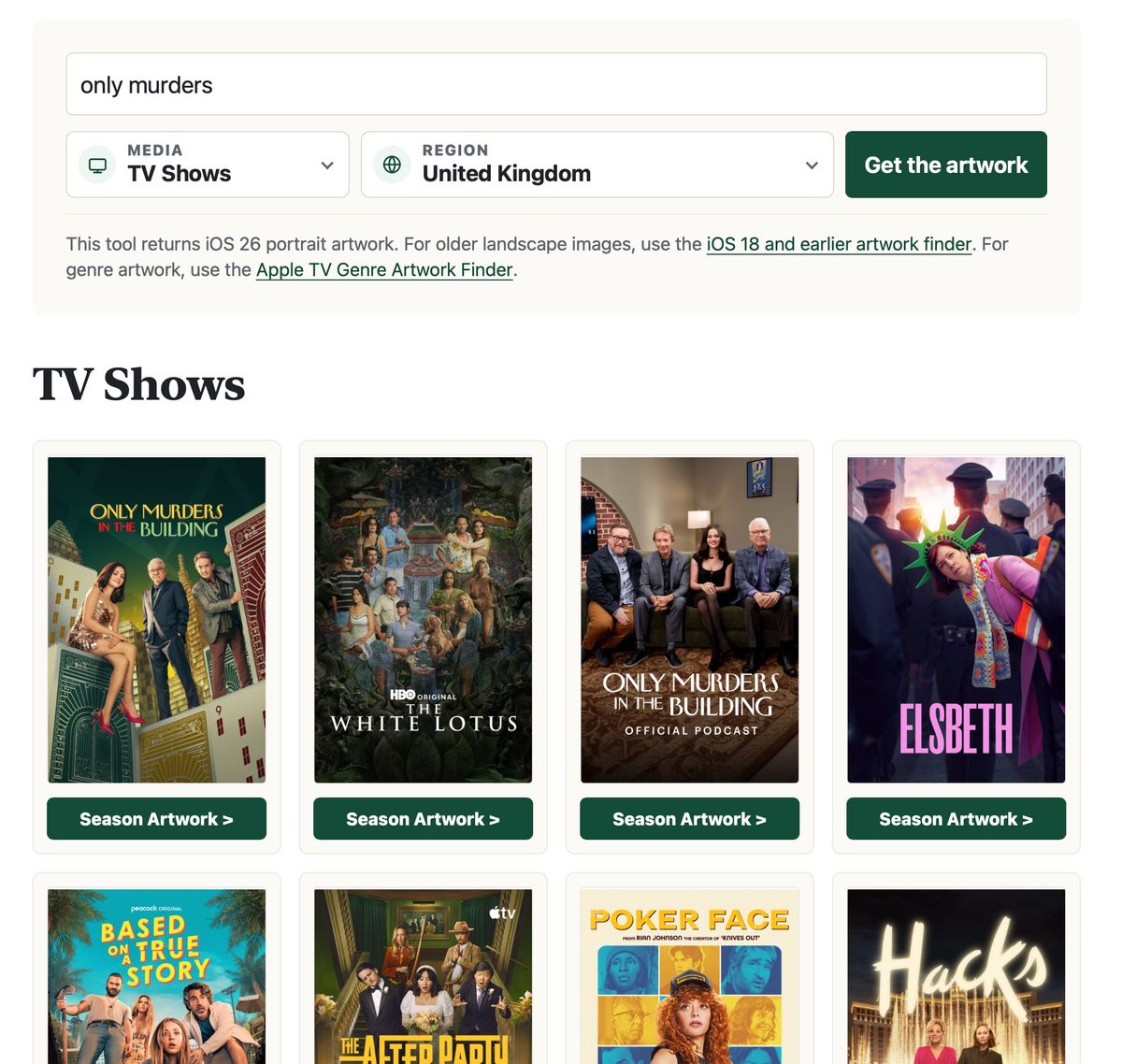
I've also added support for season artwork for TV shows which includes portrait, rectangular, and square images.
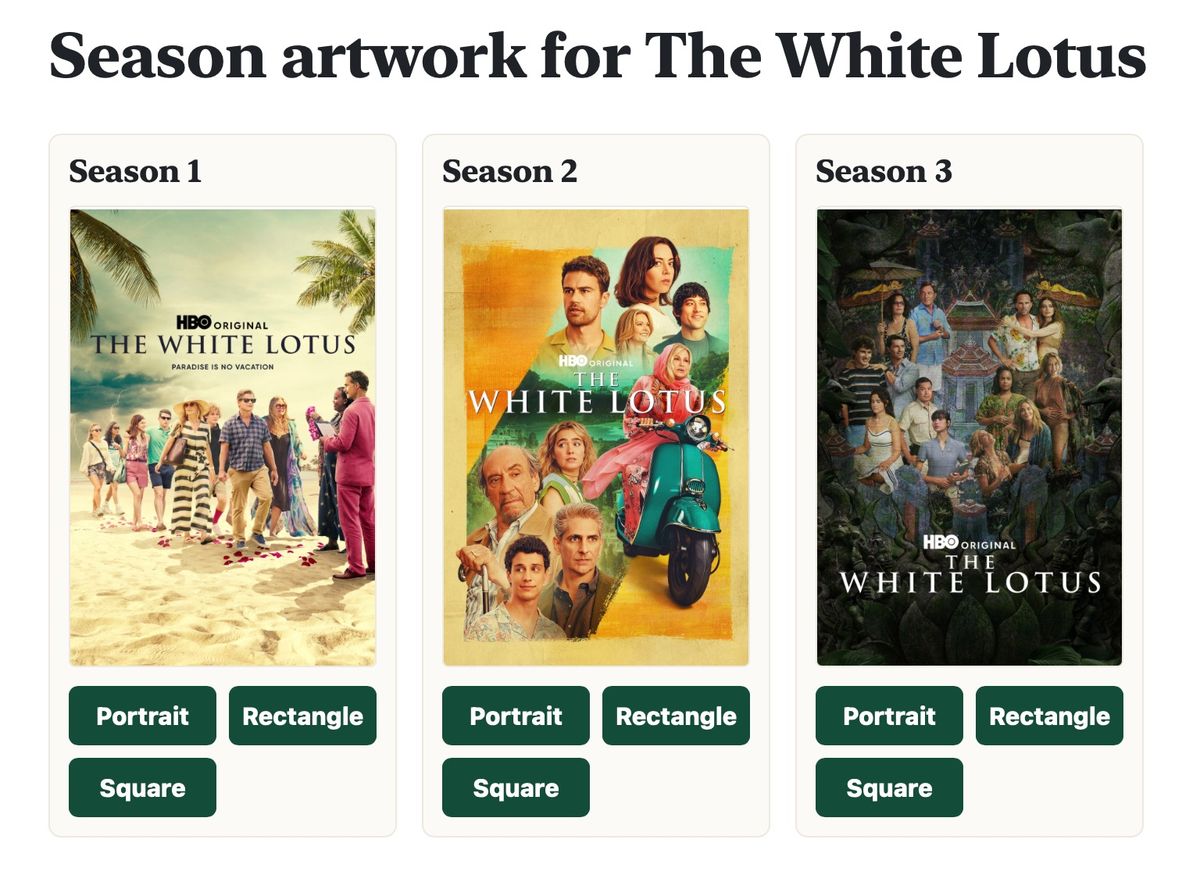
There have also been some technical improvements with things like caching, rate limiting, and changing the URL as you search so you can use the back button without resetting the entire page.
Apple TV Genre Artwork Finder
This was a request from a reader who wanted to get the artwork Apple uses within the Apple TV app to show genres. After some spelunking, I managed to work it out and now have a simple page which will fetch all the genres for a specific region in both portrait and rectangular treatments.
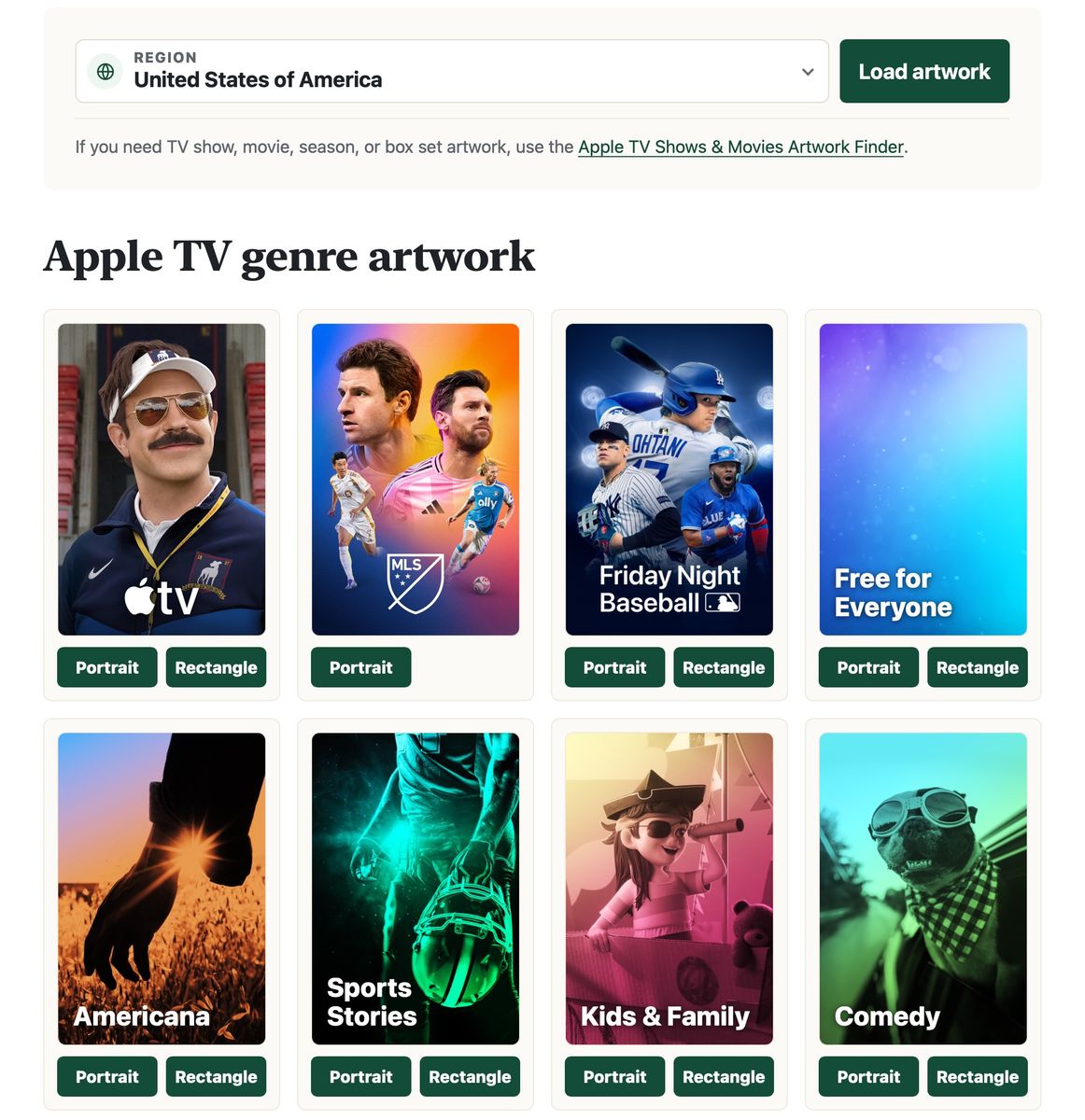
Interestingly, the genres vary wildly between regions and whilst the landscape images have the genre name baked into the image, the portrait ones do not 🤷🏻♂️
Apple Music Artwork Finder
My album artwork finder now lets you search by text as well as by Apple Music URL; previously, you needed the URL. The same technical improvements for caching have been implemented and you are offered a range of sizes as well as the highest possible resolution.
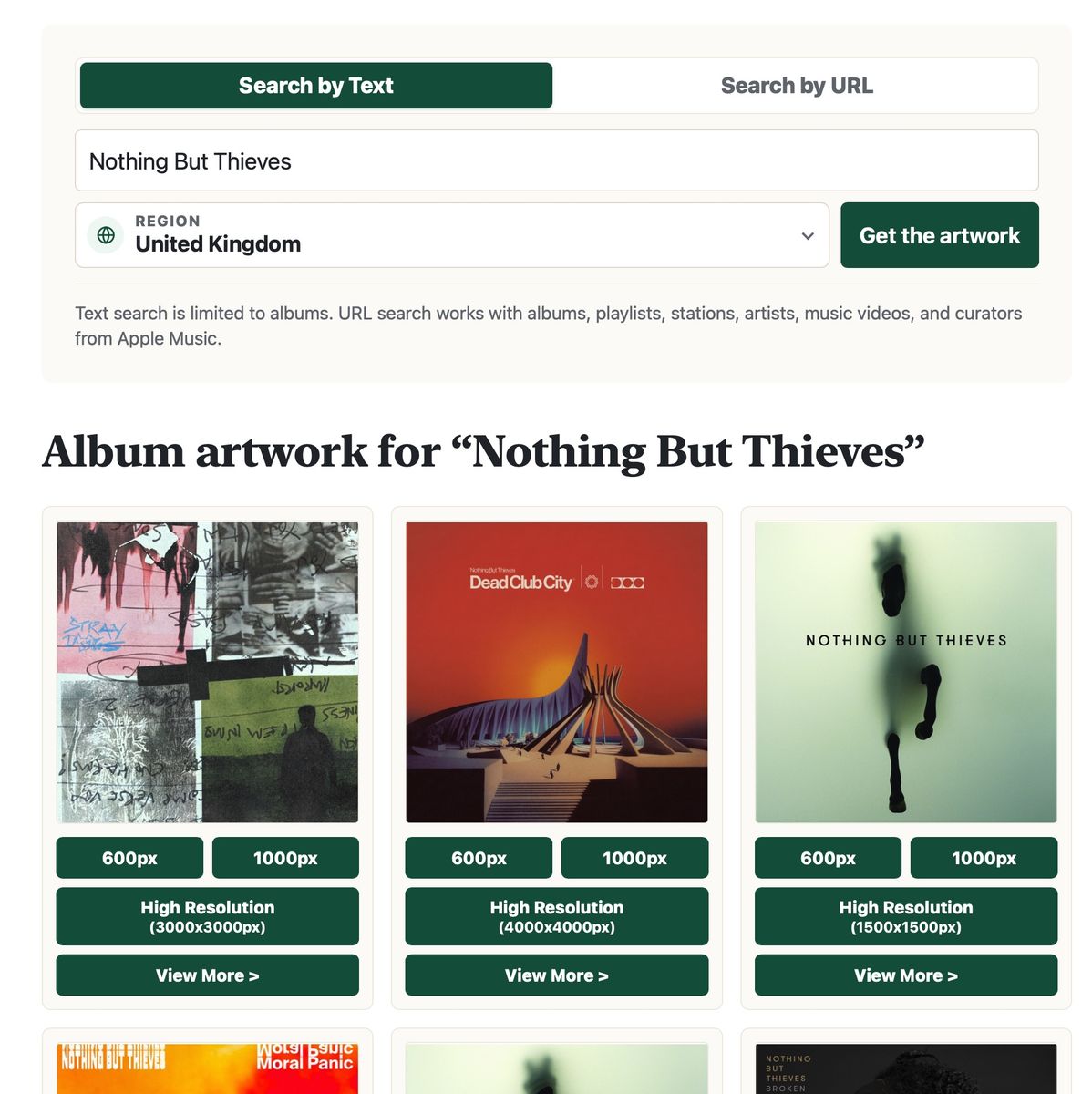
Clicking the "View More" link will take you to a page with all of the album metadata6 as well as links for animated artwork if it exists.
iTunes Artwork Finder
This has now been deprecated as most of the iTunes catalogue seems to be being wound down. I don't have any quotes on this from Apple but you can clearly see search results returning less and less content. I do not believe there are any supported iOS or macOS versions that still have iTunes as everything has migrated to either Apple Music or Apple TV.
That isn't to say this finder tool doesn't have its uses. You can still use it for finding books, apps, and a load of other artwork but if you are still using this for albums, movies, or TV shows I'd strongly suggest using one of the updated artwork finders mentioned above.
Spatial & Lossless Audio
I have a few different sites for tracking Spatial Audio and Lossless Audio which I'm going to try and consolidate in the coming months. First up was the Spatial Audio Finder which lets you search for an artist in order to see all the tracks they have that have been updated to Dolby Atmos and Dolby Audio. This was followed up by the Spatial Audio Database and Lossless Audio Database which show the latest upgrades across these audio variants.
I haven't made any UI changes to these sites as yet but I have completely overhauled the way I monitor these changes. I keep track of something like 24 million tracks on Apple Music and even though I was scanning them continuously it was taking nearly 90 days to do a complete crawl. That meant that if I checked an album one day and it was upgraded to Spatial Audio the next, the change wouldn’t appear on these sites for another 89 days.
I've improved this in a number of ways:
- Rather than having a single server check one track at a time, I now have multiple workers checking albums in their entirety. This allows me to check the status of nearly 400,000 albums per day.
- I've built in a system of dynamic prioritisation so albums that look like they might change soon get prioritised for more frequent checking. For example, an album available for pre-order will get checked each day as new tracks get released as well as being checked again on the release date.
- I've migrated to newer Apple Music APIs to get more information in a smaller number of requests.
These are all foundational improvements that needed to be made in order to support future projects including a way to browse the Spatial Audio library. Expect to see some updates to these sites soon!
Thoughts on the Apple Event
As I write this, it has been just over 24 hours since Apple's keynote in which they announced the iPhone 18 Pro, AirPods 5, Apple Watch Series 12 / Ultra 4, and iPhone Duo. I have thoughts on all of these devices but there are a couple of other things to mention first:
- Tim Cook handing over to John Ternus was a nice touch. "No no no no, not me. That's your guy. That's your opener." 🥲
- There were a lot of extras in the backgrounds. I can't tell if the pieces filmed in Apple Park are actually green screened or if there are actors / employees actually in the room. Seems like a security nightmare but then there were a lot of leaks prior to this event...
- Johny Srouji seemed to enjoy getting to talk about things other than Apple Silicon now that he's chief hardware officer.
- Apple are still absolutely nailing the pre-recorded videos. Whilst live announcements can be exciting I much prefer to get a shorter, funner experience. I'm really enjoying the variation they are adding by stepping away from Apple Park and doing more on movie backlots, beaches, etc.
- That the whole thing is filmed on an iPhone never gets old7
- None of the rumoured home stuff appeared. Expect another event in October I guess 🤷🏻♂️
iPhone 18 Pro
In any other year this would have been the closer but this year it was the first item and was rattled through pretty quickly. It does all the things that the annual iPhone cadence does well: it's faster, it has better battery life, it has better cameras. These are things that make it easier to sit out for a year but are still notable improvements. I'll be getting the Duo myself but I will be very sad to miss out on the variable aperture in the camera lens.
AirPods 5
As an AirPods Pro user, I tend to zone out for a bit when the regular AirPods update segment comes along but this looks like a solid update with Active Noise Cancellation on all models and a lower price. That £119 must be important to Apple as I can't for the life of me work out why there is another model that is just £20 more but adds wireless charging, the force swipe sensor, and an extra hour of battery life. £139 for a base model seems reasonable to me in this economy but clearly the numbers have been run and this weird split is the outcome.
Apple Watch Series 12 / Ultra 4
The Apple Watch got a decent set of upgrades this year with a new chip enabling more frequent heart checks and some new AI features. As someone that has a hypertension notification from their Apple Watch every month I'm certainly happy to have more data to work with. With the AI features, I'm a little confused by the "rewind 15 seconds" feature as if real life is a TV show; the contrived example of a waiter reading out specials seems unlikely as you'd either ask them to repeat it or, by the time you try and remember, you're past the 15-second window. Maybe it's just not for me. The always listening conversation summary is much more intriguing to me though. Since the feature was announced, I've already found a few places it would be useful to me such as when my son's saxophone teacher hurriedly explains what he needs to practise for next week before she starts her next lesson. There are obviously some privacy concerns but I think Apple is more likely than anyone else to get this right; I'm certainly interested to try it out.
The biggest issue for me this year was deciding which model to pre-order. I've typically been buying the Apple Watch on a two-yearly cycle and I've leaned towards the Hermès models in recent years as I love their extra watch faces (especially Hermès Circulaire) and the fancier bands. However, my favourite Apple Watch was the Series 3 Edition in ceramic white. The ceramic case returns this year but with two caveats: it comes in pearl white rather than pure white, and it isn’t available on the Hermès models. Those stick with titanium, even though ceramic is the most expensive material option. After taking far too long to make a decision I decided the white case was worth losing some watch faces.
iPhone Duo
This was the worst-kept secret going into the event but also the one with the biggest surprises. I was always planning on getting this device8 but if I'd have had any doubts at all then that opening animation would have sold me. It's a small thing in the grand scheme but it makes an action that will likely be performed multiple times a day feel premium in the same way that "swipe to unlock" did on the original iPhone9. The other surprise was that the UI is markedly different from any other iPhone with navigation bars, toolbars, and tab bars all moved into a horizontal menu on the side. Whilst this looks like an absolute win for UX, it does make me a little nervous after going through the developer videos with multiple new "poses" that need supporting for this device that will be niche for a long while:
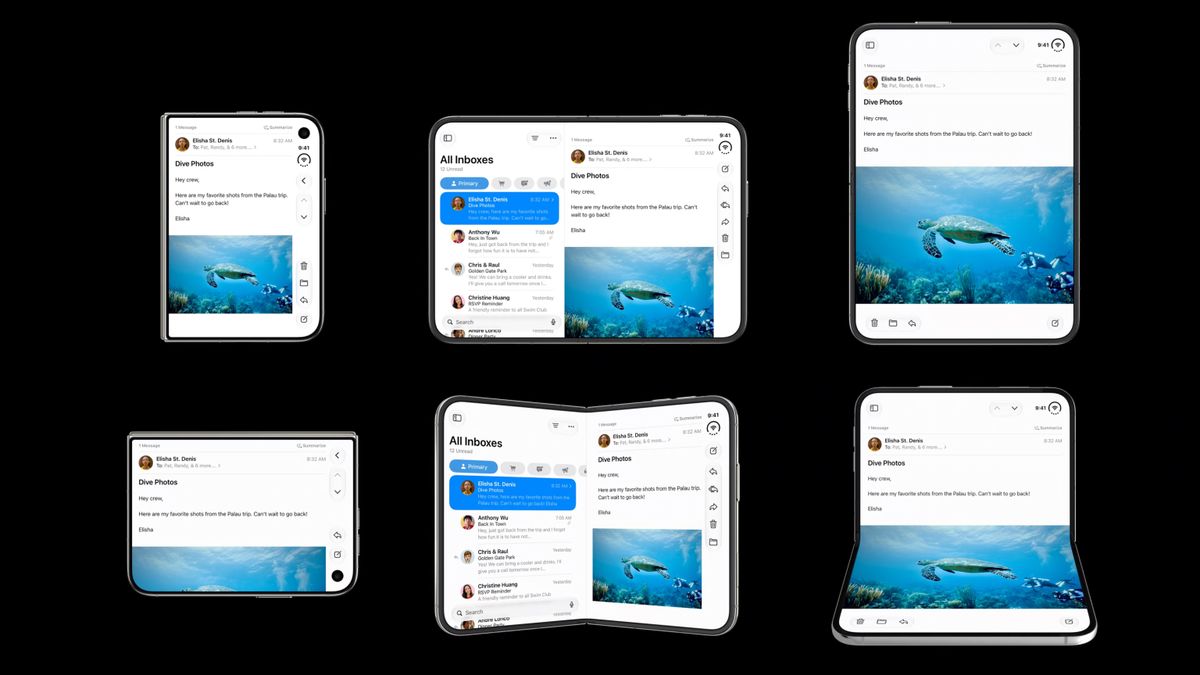
I love the way you can use it like a little laptop when viewing video with a live reflection on the bottom panel containing the playback controls. The partially folded book is also interesting with UI moving to the sides and a split keyboard option.
There are of course a few trade-offs for this device:
- Cameras: This is the biggest pain as the dual cameras it contains appear to be somewhere between the iPhone 17e and iPhone 17 in terms of quality. I don't use the telephoto 5x that much on my iPhone 16 Pro but it was nice to have and I'm certainly lusting over the new camera system in the iPhone 18 Pro. That said, so much of photography on iPhone is computational and the A20 chip is certainly going to improve that.
- Action Button: There is no Action Button on the Duo but there is one for Camera Control. A lot of people are rightly negative about the swipeable aspects of that button but I do like it as a physical way to launch the camera app, something I previously tied to my Action Button. My issue is that I have HomeKit-enabled smart locks and I now tie my Action Button to the unlock action making it very convenient for unlocking the door as I head towards it. That will no longer be an option for me but hopefully it won't be long until some of the UWB smart locks start arriving in the UK.
- Price: £1,999 is an awful lot for a phone, especially a first-generation model.
I'm trying to temper my excitement for this device as Apple's marketing has definitely caught me a few times before (*cough* Vision Pro *cough cough*) but so far the previews are very positive. I'm certainly looking forward to adapting some of my personal apps as soon as Xcode 27.1 and the iPhone Duo Simulator are available!
Recommendations
Video Games
- MIO: Memories In Orbit - This launched at the start of the year and I had it on my wishlist with the intention of playing it on the Steam Deck. Turns out it got added to Game Pass recently so I played it on the Series X instead. MIO is a metroidvania that I would pitch somewhere between Prince of Persia: The Lost Crown and Hollow Knight: Silksong10 in terms of difficulty; there are some absolutely brutal platforming and fighting challenges but at least when you fail you get spawned fairly close to where you were. The music was a real highlight for me, especially the track Calderon which ratchets up the number of layers as you get through the boss's attack phases. A very easy recommendation!
- The Blood of Dawnwalker - The debut game from developer Rebel Wolves (who count a number of Witcher 3 alumni amongst them) sees you thrust into 14th-century Europe as the titular dawnwalker who can use human and witch powers in the day and vampiric powers at night. You have 30 days to save your family from the vampires that rule the region you live in but time is at a premium; most actions, including levelling up, will advance the clock meaning you cannot do everything. Whilst the inspirations from The Witcher 3: The Wild Hunt are obvious, I think it shares an awful lot with Far Cry 5, particularly the way in which you have to destroy bases to annoy the lieutenants of the main villain in order to call them out. I'm around a third of the way in but I'm impressed so far, even if they need to move "The" in the title two words across 😜
TV
- Widows Bay - This would have been a solid recommendation from me in the week it came out but bearing in mind it just won the most Emmys for a debut comedy show this week my recommendation is a little "well duh". Regardless, this is a phenomenal series on Apple TV. It's a mixture of horror and comedy but speaking as someone that jumps at the sight of a moth11 it is definitely not that scary. I full-on belly laughed multiple times throughout this show, particularly the "Run" card game. The best TV show so far this year.
- The Gentlemen - I enjoyed Guy Ritchie's 2019 film The Gentlemen, particularly the idea of large country-house owners agreeing to let weed farms run in their grounds to help with the running costs. The TV series, confusingly named The Gentlemen, debuted in 2024 and was excellent with a good balance between comedy and violence. Season 2 has just aired and is also very good, though I'd say not as funny as Season 1. Well worth a watch though along with Mobland which also gets a Season 2 this month.
Music
- The Wow! Signal by Muse - I've been a big fan of Muse ever since the 2001 album Origin of Symmetry. Whilst each of their albums has at least a few tracks I've enjoyed, this is the first one that sounds like they did 25 years ago. Cryogen is a particular standout that is strongly reminiscent of Plug-in Baby but it is Hush (in collaboration with Ellie Goulding) that is my favourite track.
Products
- LEGO Minas Tirith - As a white male in his forties, it is somewhat inevitable that I love The Lord of the Rings and particularly the White City12 of Minas Tirith. I also love LEGO. Enter this 8,278-piece set which includes a forced perspective of the city and then a detailed interior of the throne room replete with Denethor (and his chicken and tomatoes). It is a huge set and took me a great deal of time to build, but I absolutely love it.
- Pebble Index 01 - I decided to take a chance on this $75 smart ring that is effectively a single button that captures short snippets of audio into the Pebble app. I have it hooked up to OpenClaw on my Mac Studio so that I can hold the button and have items added to my Things inbox automatically. This has been a gamechanger as the previous Siri integration always needed "With Things, remind me to ..." which didn't work reliably enough for me. It looks like iOS 27 has fixed that so I may not continue to wear this but it is certainly an interesting curio, particularly in that it has no need for charging as it has a fixed 2-3 year battery life. Some see that as a negative, but I think it works well for this sort of niche product.
Roadmap
The roadmap is my way of committing to what I’m going to do before the next issue:
8th June 2023 - 15th September 2026
- Complete the Lossless Audio integration in Music Library Tracker v3 ✅
- Get the BoardGameGeek collection sync complete in Board Game Lists ✅
OK, it has been over 3 years so I can't pat myself on the back too much but I did get both of these features integrated 😂
16th September - 14th October (Issue #12)
- Continue iterating on Artwork Finder depending on tester feedback
- Do a quick update on Browser Note to support iOS 27 and prepare for the iPhone Duo
- Open up the codebase for Music Library Tracker v3 and get back up to speed with the scanning engine. I want to get a beta test out before Christmas...
- Actually send another newsletter in 4 weeks
Final Thought
Have you upgraded to macOS Golden Gate but still need to use Xcode 26? Just create a shortcut with the "Run Shell Script" action with the following code:
"/Applications/Xcode-26.6.0.app/Contents/MacOS/Xcode" -SkipCompatibilityCheck >/dev/null 2>&1 &
This will allow it to run even though it is technically not supported! I have this connected to my Stream Deck so I can press a single button to open the previous version of Xcode.
That’s all for this issue – hopefully the next one won’t take three years! If you have any feedback, questions, or suggestions for things you'd like me to talk about, drop me an email at ben@bendodson.com - I love hearing from you. And if you know someone who’d enjoy the newsletter, please pass it along.
Until next time,
– Ben
-
I don't know what I was thinking about with that mint green background previously... ↩
-
It only took... checks notes... 19 years. ↩
-
In fact, the images in this very newsletter also come from the same service 🤫 ↩
-
You can still get the iOS 18 style landscape artwork via the old artwork finder ↩
-
What was previously known as "Apple TV+" but is now Apple TV which runs in the Apple TV app on the Apple TV 🫠 ↩
-
Including genre information thanks to a reader's request ↩
-
Yes I know they have professional rigs and all the rest of it but it is still impressive ↩
-
It's necessary for my job... honestly ↩
-
Steve Jobs demoed it twice during the original iPhone launch before performing a prank call to Starbucks. Those were the days. ↩
-
What is with all these excellent metroidvania games having a colon in their name? ↩
-
Sad but true ↩
-
Not to be confused with the area of London that houses the Apple Store I queued at for 9 hours to get an iPhone 4 on launch day. I do not miss those days! ↩